

Fix GTA IV stuttering and low FPS with a GTA 4 Vulkan mod setup using DXVK (D3D9-to-Vulkan), shader cache tweaks, and proven settings for smoother gameplay
Why DXVK helps GTA IV
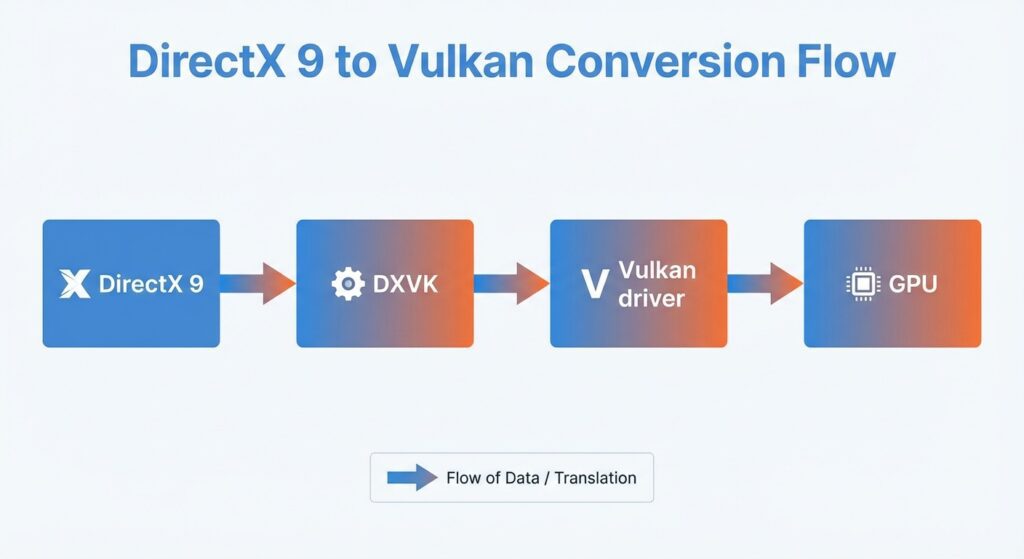
DXVK is a Vulkan-based implementation of Direct3D (including D3D9), and on GTA IV it’s commonly used to route the game’s older DirectX 9 rendering through Vulkan for better CPU-side efficiency and frame pacing. In plain terms: GTA IV can be weirdly CPU-limited on modern systems, and DXVK often reduces that “micro-freeze when turning a corner” feeling once caches settle in.[github]
One thing to know up front: shader compilation stutter can still happen at first, but it typically fades as DXVK builds a persistent shader cache during gameplay. The first run can feel a bit rough, then the second or third launch suddenly feels “oh wow… there it is.”[nexusmods]
Quick comparison (what you’re changing)
| Setup | What it uses | Stutter behavior | Best for |
|---|---|---|---|
| Vanilla GTA IV | DirectX 9 native | Can hitch from CPU/render-thread limits | Simple, no extra files |
| DXVK (Vulkan) | D3D9 → Vulkan translation | Some first-run shader stutter, improves as cache builds [nexusmods] | Smoother frame pacing, often higher FPS |
| DXVK + async-style shader handling | DXVK + async compilation approach | Can reduce severity of shader hitches [nexusmods] | People sensitive to stutter |
Before you start (prereqs + safety)
DXVK on Windows can work, but it’s not officially supported by the DXVK project—so expect occasional edge cases depending on drivers, overlays, and the overall Windows setup. Also, do not replace system DLLs inside Windows System32/SysWOW64 with DXVK DLLs; that can break your Windows install.[github]
Checklist (2 minutes, saves headaches)
- Update GPU drivers (newer Vulkan support and fixes matter more than people admit).[github]
- Make sure your system has a Vulkan driver/loader from your GPU vendor; the Vulkan loader is typically delivered with the vendor’s driver package.[vulkan.lunarg]
- Disable overlays if you troubleshoot crashes: Steam/Epic overlays, Nvidia GeForce Experience overlay, RTSS overlay, OBS capture hooks—these can interfere with DXVK on Windows.[github]
Personal note: I’m not anti-overlay, but for GTA IV + DXVK, overlays are the first thing I turn off when anything feels “off.” It’s boring advice. It works.
Step-by-step: Install DXVK for GTA 4 (Windows)
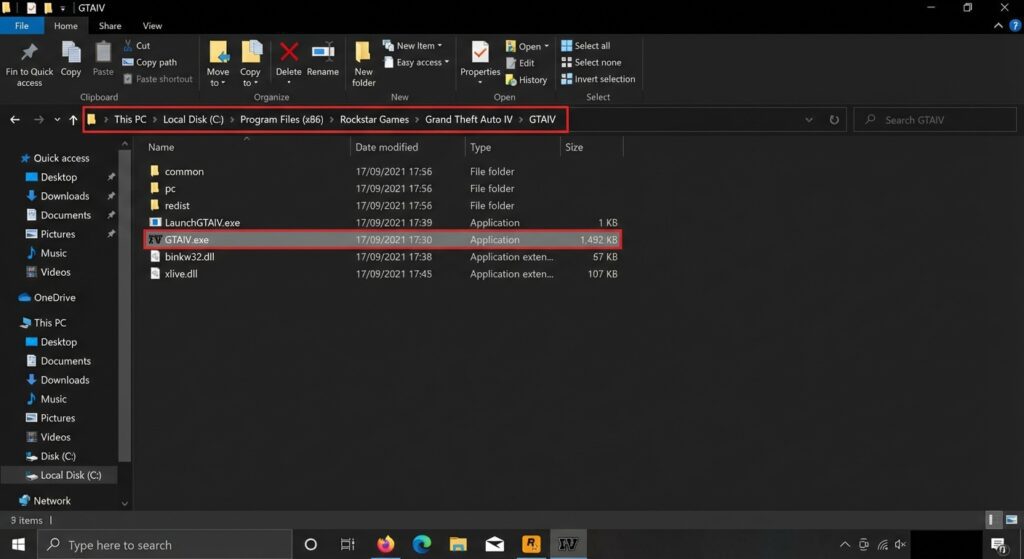
These steps assume GTA IV: Complete Edition and a normal install where you can access the game’s root folder (the one that contains GTAIV.exe).
1) Download the essentials (safe sources)
Use official/authoritative sources where possible.
DXVK (official releases):[github]
FusionFix (recommended companion mod): FusionFix is a community mod that aims to fix and enhance GTA IV: Complete Edition on modern systems.[fusionfix]
DXVK Windows notes (read if something breaks):[github]
Download buttons (paste as-is)
2) Copy the right DXVK DLLs for GTA IV
GTA IV is a 32-bit DirectX 9 title, so you typically use the 32-bit D3D9 DXVK DLL (d3d9.dll) from the DXVK package and place it next to GTAIV.exe. If you accidentally drop in 64-bit DLLs, Windows apps won’t load them (and you’ll just waste time wondering why nothing changed).[github]
3) Install FusionFix (strongly recommended)
FusionFix is designed to fix a wide range of technical issues and limitations in GTA IV: Complete Edition, and it’s one of those mods I now consider “baseline.” Install it according to the release instructions (usually extract into the GTA IV root folder).github+1
Best DXVK settings (dxvk.conf) to cut stutter
DXVK supports config options via dxvk.conf, and the official sample config documents a lot of knobs you can tweak. For GTA IV specifically, you’re mostly aiming for smoother presentation, fewer weird fullscreen issues, and predictable frame pacing.[github]
Recommended starter dxvk.conf (GTA IV-friendly)
Create dxvk.conf in the same folder as GTAIV.exe, then paste and tweak:
# GTA IV DXVK starter tweaks

# Prefer borderless fullscreen if you run into alt-tab weirdness.
# (DXVK docs generally recommend Borderless Fullscreen on Windows.)
# Note: This is a gameplay/UI choice too.
dxvk.allowFse = False

# Optional: If you need true exclusive fullscreen, you can enable it.
# dxvk.allowFse = True

# Frame limiter (optional). Can help stabilize pacing on some setups.
# d3d9.maxFrameRate = 60
Why this helps:
- DXVK notes that fullscreen handling can be tricky on Windows, and borderless fullscreen is generally preferred if it’s available.[github]
- DXVK explicitly documents
dxvk.allowFseas the setting that lets the Vulkan driver opt into exclusive full-screen mode on Windows.[github]
Personal observation: Exclusive fullscreen can feel slightly snappier on some rigs, but I’ve also had it cause annoying alt-tab problems. So yeah, I usually start borderless, then get fancy later.
Don’t ignore shader cache reality
Async-style approaches and shader caching exist for a reason: shader compilation is a big part of the “first time I drive into Times Square… hitch… hitch…” experience. Some guides also recommend adjusting Steam’s Vulkan shader caching behavior if it interferes with DXVK’s own cache file location (this comes up in the wild more than it should).ant-sh.blogspot+1
Troubleshooting (common gotchas)
If GTA IV crashes, refuses to launch, or performs worse, it’s usually one of these.
Fixes that work surprisingly often
- Disable third-party overlays and capture hooks (Steam overlay, GeForce Experience overlay, RTSS, OBS).[github]
- Double-check you didn’t mix system DLLs or put DXVK files in System32/SysWOW64 (don’t do it).[github]
- If fullscreen is glitchy, try borderless and only enable exclusive fullscreen (
dxvk.allowFse = True) if you really need it.github+1
When to stop and roll back
DXVK isn’t officially supported on Windows, and some issues can be outside DXVK’s control (driver quirks, overlays, vendor libraries, etc.). If you’re chasing stability for a long playthrough, it’s okay to revert to vanilla or try a different DXVK version from the official releases page.[github]
CTA (and a question for you)
If you try this GTA 4 Vulkan mod (DXVK) setup, leave a comment with your GPU + CPU, your average FPS before/after, and whether your stutters improved after the second launch.
Want a follow-up post? I can write a tighter “best settings for low-end PCs” GTA IV guide (FusionFix + commandline + traffic/view distance sanity) if you tell me your specs.