
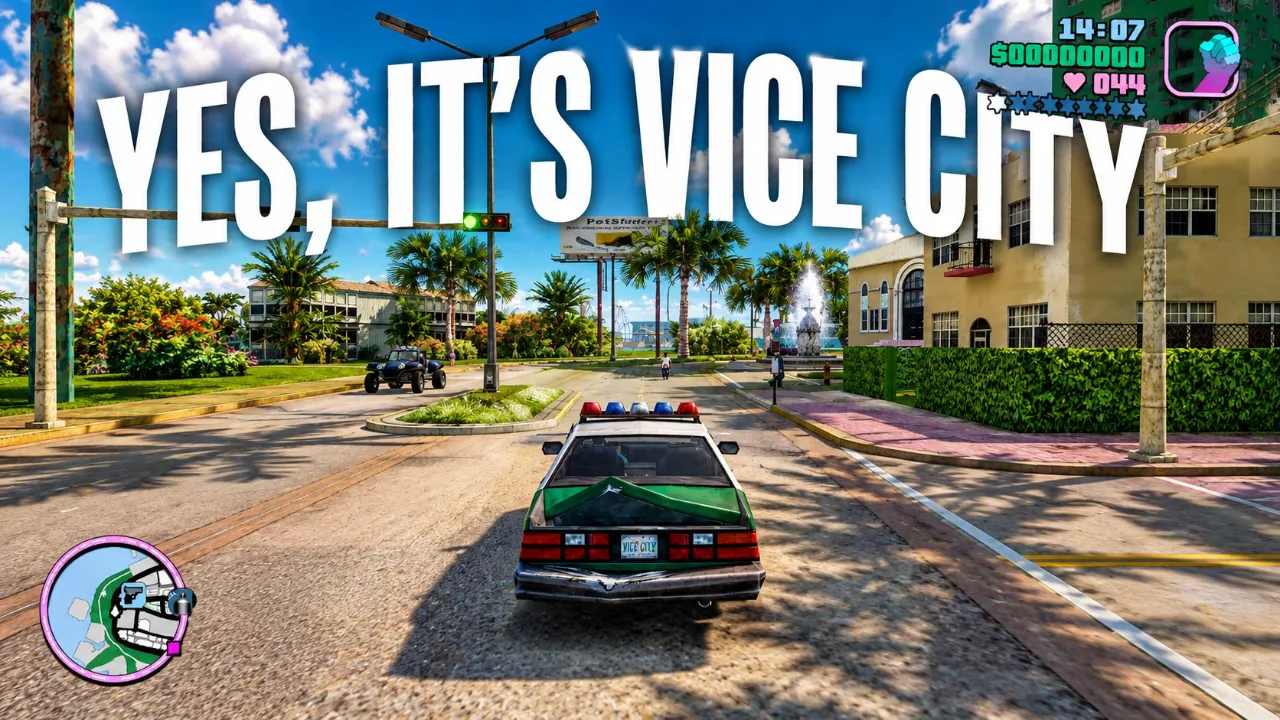
If you’ve ever wanted GTA Vice City to look like a modern game without changing its classic feel, Good Shaders VC August is one of the best graphics mods you can install.
In this guide, I’ll walk you through the complete installation process, including all required dependencies such as Open Limit Adjuster, SilentPatchVC, VC Essentials Pack, and III.VC.SA Windowed Mode. By the end, you’ll have a stable, visually enhanced version of Vice City with improved lighting, reflections, shadows, and overall graphics.
Features
Good Shaders VC August includes several visual improvements:
- Realistic lighting
- Dynamic shadows
- Enhanced reflections
- Better ambient lighting
- Improved weather effects
- Rich color grading
- Modern post-processing
- Preserves the original Vice City atmosphere
System Requirements
- GTA Vice City v1.0 (Clean Installation Recommended)
- Windows 10 or Windows 11
- DirectX-compatible graphics card
- 4 GB RAM minimum (8 GB recommended)
- Administrator privileges
Required Downloads
Download the following files before beginning the installation.
| File | Download |
|---|---|
| Good Shaders VC August | Download Link |
| GTA Vice City | Get it in legitimate site or buy game |
| VC Essentials Pack | https://www.mixmods.com.br/2020/08/vc-essentials-pack/ |
| Open Limit Adjuster | https://github.com/GTAmodding/III.VC.SA.LimitAdjuster/releases |
| SilentPatchVC | https://github.com/CookiePLMonster/SilentPatch/releases |
| III.VC.SA Windowed Mode | https://github.com/ThirteenAG/III.VC.SA.WindowedMode |
Check Can You RUN GTA 6?: https://www.caniplaygta6.com/
Installation Order
Install everything in the following order:
- GTA Vice City Fixed
- Open Limit Adjuster
- SilentPatchVC
- VC Essentials Pack
- III.VC.SA Windowed Mode
- Good Shaders VC August
Following this order helps ensure compatibility and avoids common installation issues.
Step 1 – Install GTA Vice City Fixed
Open the GTA Vice City Fixed archive.
Copy all files into your GTA Vice City installation folder.
Replace any existing files if Windows prompts you.
Step 2 – Install Open Limit Adjuster
Extract the Open Limit Adjuster archive.
Copy all files into the main GTA Vice City folder.
This plugin increases engine limits, allowing modern graphics mods and large mod packs to function correctly.
Step 3 – Install SilentPatchVC
Open the SilentPatchVC archive.
Copy every file into your GTA Vice City directory.
SilentPatch fixes numerous bugs in the original PC version and improves compatibility with modern operating systems.
Step 4 – Install VC Essentials Pack
Extract the VC Essentials Pack.
Copy everything into your GTA Vice City installation folder.
This package includes several essential components required by many Vice City mods.
Step 5 – Install III.VC.SA Windowed Mode
Open the III.VC.SA Windowed Mode archive.
Copy all files into the game folder.
This plugin enables proper windowed and borderless fullscreen support, making it easier to Alt-Tab and improving compatibility with modern displays.
Step 6 – Install Good Shaders VC August
Finally, open the Good Shaders VC August archive.
Copy every file into your GTA Vice City installation folder.
When Windows asks to replace existing files, click Replace.
The installation is now complete.
Launch the Game
Start GTA Vice City.
The first launch may take a little longer while the shader cache is generated.
Once the game loads, you’ll immediately notice:
- More realistic lighting
- Improved reflections
- Better shadows
- Enhanced weather
- Richer colors
- A modern visual experience while preserving the classic Vice City atmosphere
Troubleshooting
Game Doesn’t Launch
- Make sure you’re using a clean GTA Vice City installation.
- Install every dependency in the correct order.
- Run the game as Administrator.
Black Screen
Verify that all required plugins and dependencies were installed correctly.
Low FPS
Reduce shader quality or lower your game resolution for better performance.
Frequently Asked Questions
Is Good Shaders VC August safe?
Yes. As long as you download the required tools from trusted or official sources, the installation is safe.
Does it work with the Steam version?
Most classic GTA mods work best with the original GTA Vice City v1.0 executable. Steam users may need to downgrade their game before installing advanced graphics mods.
Will it affect my saved games?
Normally, no. However, it’s always recommended to back up your save files before installing any mods.
Video Tutorial
Prefer watching the installation?
▶ Watch the Full YouTube Tutorial Here: (Insert Your YouTube Video Link)