

Install a GTA 5 Performance ENB Pack 2026 to boost FPS, sharpen graphics, and keep gameplay smooth on modern PCs.
What Is a GTA 5 Performance ENB Pack?
An ENB pack for GTA 5 is a collection of ENBSeries files and preset configs that inject advanced effects into the game’s DirectX 11 rendering pipeline. It adds things like better lighting, reflections, ambient occlusion, color correction, and post‑processing on top of the vanilla engine.
A performance ENB pack does all that but trims the heaviest features so you get sharper, richer visuals without tanking your framerate the way ultra‑cinematic presets often do. It is basically a “sweet‑spot” configuration aimed at stable 60+ FPS on mid‑range and high‑end rigs instead of pure screenshot glory.
From real‑world use, this kind of pack feels like the game finally matches what your GPU is capable of, without that annoying “looks great but runs like a slideshow” trade‑off.
How ENB Affects FPS & Graphics
Why ENB can destroy FPS
ENB hooks directly into the GPU pipeline as a post‑process wrapper (d3d11.dll and related binaries) and renders extra passes for lighting, shadows, reflections, and color grading. Those extra passes cost a lot of GPU time, especially at night with many light sources and reflections, which is why heavy presets can cut FPS almost in half on the same system.
Players using graphic overhauls like NaturalVision Evolved report that ultra ENB presets can drop 4K performance from over 100 FPS to below 30 FPS until they switch to a medium or performance preset. Nothing feels worse than upgrading your card and then watching the game crawl because of one preset.
What performance ENB packs do differently
Performance‑oriented ENB presets for GTA 5 usually:
- Tone down SSAO, skylighting, and very soft shadows.
- Simplify or reduce reflections and specular highlights.
- Disable heavy depth of field, lens flares, and extreme bloom.
- Balance sharpening and color correction so the image looks clean, not oversharpened.
The result: still a big jump over vanilla visuals, but with a much smaller FPS penalty compared to ultra presets.
System Requirements & Prep (2026)
A GTA 5 Performance ENB Pack 2026 targets modern Windows 10/11 systems with DirectX 11 and recent GPU drivers, since ENBSeries for GTA 5 is built around DX11 binaries. As a rule of thumb, you want:
- A 6‑core or better CPU (Ryzen 5 / Intel i5 or above).
- At least 16 GB RAM.
- A mid‑range or higher GPU (e.g., RTX 3060/4060, RX 6600 or better).
- GTA 5 on SSD for faster streaming.
Before installing any ENB pack:
- Verify GTA 5 files (Steam/Rockstar/EPIC) so you start from a clean baseline.
- Back up your current GTA5.exe folder and any existing ENB/ReShade/graphics mod files.
- Update GPU drivers to the latest version from NVIDIA/AMD to avoid crashes when ENB hooks into DirectX.
It takes a bit of discipline, but those backups save a lot of pain when a new preset does not play nice.
Step‑by‑Step: Installing a Performance ENB Pack (2026)
This is the typical install flow used in current ENB tutorials for GTA 5 and works fine with the latest game updates.
- Download ENBSeries for GTA 5
- Go to the official ENB developer page:
ENBSeries for GTA 5. - Download the latest GTA 5 ENB build (the newest version listed for GTAV).
- Go to the official ENB developer page:
- Download your Performance ENB Pack
- Pick a performance‑friendly ENB preset or pack from a trusted site like GTA5‑Mods ENB presets.
- Many “medium” or “optimized” presets explicitly advertise higher FPS with NVE or QuantV.
- Copy ENB binaries into GTA 5
- Extract the ENB zip and open the WrapperVersion folder.
- Copy the ENB .dll files and config files (not the readme/license) into your GTA 5 main directory (where GTA5.exe is).
- Install the preset files
- Drop the preset’s ENB config files (enbseries.ini, etc.) into the same main GTA 5 folder, overwriting existing ENB config if prompted.
- Launch and open the ENB menu
- Start GTA 5; if ENB is hooked, you will see ENB text during loading.
- In‑game, press Shift + Enter to open the ENB menu and confirm your preset is active.
It is a simple drag‑and‑drop process, but missing even one .dll can make it look like nothing works, so do not rush the file copying.
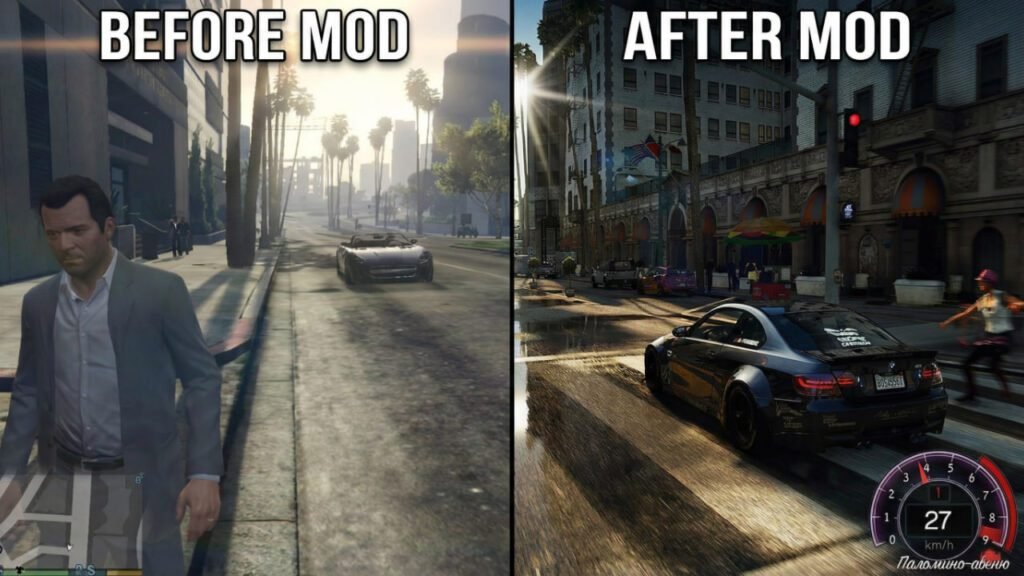
Best ENB Settings to Boost FPS
Must‑tweak ENB options
Once the Performance ENB Pack 2026 is installed, you can squeeze extra FPS by turning down a few heavy options in the ENB menu.
Focus on:
- Ambient Occlusion (AO): Lower quality or disable if you are chasing maximum FPS; AO is one of the biggest performance hogs.
- Skylighting / Indirect Lighting: Medium quality is usually enough; ultra levels eat frames, especially in dense city areas.
- Soft Shadows: Switch to a medium preset or reduce filter quality; ultra‑soft shadows look great in screenshots but hurt performance.
- Depth of Field (DOF): Disable in gameplay; most players do not miss it and gain noticeable FPS.
- Reflections & Specular: Use medium reflections and limit them at night when light sources are dense.
It is surprising how often turning off just DOF and toning down AO makes the game feel instantly smoother.
In‑game graphics settings that matter
Combine ENB tuning with sane in‑game settings:
- Keep MSAA low (2x) or off; rely on ENB sharpening and resolution instead.
- Set Grass Quality to High instead of Ultra; big FPS win in rural areas.
- Test Extended Distance Scaling and Extended Shadows Distance—dial them down a notch if stutters appear.
- Enable V‑Sync or frame‑limit via driver to avoid erratic frame times.
Visual Quality vs FPS: Vanilla vs ENB
A rough, experience‑based comparison of typical setups:
Exact numbers will vary per PC, but the pattern is consistent: performance‑tuned ENB builds sacrifice a bit of eye candy to keep gameplay fluid.
Safe Download Sources & Example Button
When dealing with ENB packs in 2026, stick to a few trusted places:
- Official ENB binaries:
ENBSeries official download for GTA 5. - Curated GTA 5 mod hubs:
- Detailed how‑to guides:
- Download & Install ENBSeries for GTA 5 – GameDecide.
- Recent step‑by‑step video guides on installing ENB with the latest GTA 5 updates.
Here is an example download button you can drop into your post (update the title or link if you use your own pack):
That shortcode both stands out visually and reinforces your main keyword in the button text.
Troubleshooting Common ENB Issues
A few problems pop up again and again with GTA 5 ENB setups:
- Black / white screen on launch: Often caused by conflicting graphics mods or wrong ENB files; reinstall ENB from the official site and remove old d3d11/d3dcompiler DLLs.
- Massive FPS drops after installing NVE or heavy presets: Switch to a medium/performance ENB preset and disable DOF and ultra lighting; users frequently report 40–50% FPS gains doing this.
- Crash after updates: After a big GTA 5 patch, verify files, update ScriptHook and other dependencies, then reinstall ENB so it hooks correctly to the new build.
It is normal to need a couple of runs of “tweak a bit, test, tweak again” before everything clicks. Once it is dialed in, you rarely touch it again.
If you are tired of GTA 5 looking flat but cannot stand 30 FPS, a GTA 5 Performance ENB Pack 2026 is honestly the sweet spot—better lighting, richer colors, and still smooth driving through Los Santos.
- Try a performance‑oriented preset from a trusted ENB creator, then fine‑tune AO, DOF, and shadows until it feels right for your rig.
- Use the download button above as your main CTA in the post, and consider linking out to the official ENBSeries for GTA 5 page so readers can grab the latest binaries themselves.