

Let me be real with you — there are few things more frustrating than setting up a beautiful mod loadout in GTA 5, hitting play, and watching the game crash to desktop before you even see Los Santos. I have been there more times than I care to admit. And with Rockstar pushing a GTA 5 update in late January 2026 that broke Script Hook V almost overnight, the modding community is once again scrambling for answers.[reddit]
The good news? Every single crash type has a fix. You just need to know where to look.
Why GTA 5 Mods Crash in 2026
Before jumping into solutions, it helps to understand what is actually breaking. GTA 5 mod crashes almost always fall into one of five categories:[youtube]
- Script Hook V version mismatch — the most common cause after any Rockstar update
- Outdated or corrupt gameconfig.xml — your game cannot handle the number of active mods
- ERR_FIL_PACK_1 error — too many RPF packfiles loaded simultaneously[gta5-mods]
- ERR_MEM_EMBEDDEDALLOC_ALLOC — insufficient heap memory allocated to the game[youtube]
- Conflicting .asi plugins or mods — one bad mod file drags the whole game down[youtube]
Knowing your crash type saves a huge amount of time. Does the game crash on startup with an error popup? That is almost always Script Hook V. Does it crash silently on the loading screen with no message? That usually points to gameconfig or a conflicting mod in your mods folder.
Fix 1: Update Script Hook V Immediately
This is the big one in 2026. Every time Rockstar releases a game update, Script Hook V — the foundation that makes almost every GTA 5 mod work — becomes incompatible until its developer, Alexander Blade, releases a new version.[youtube]
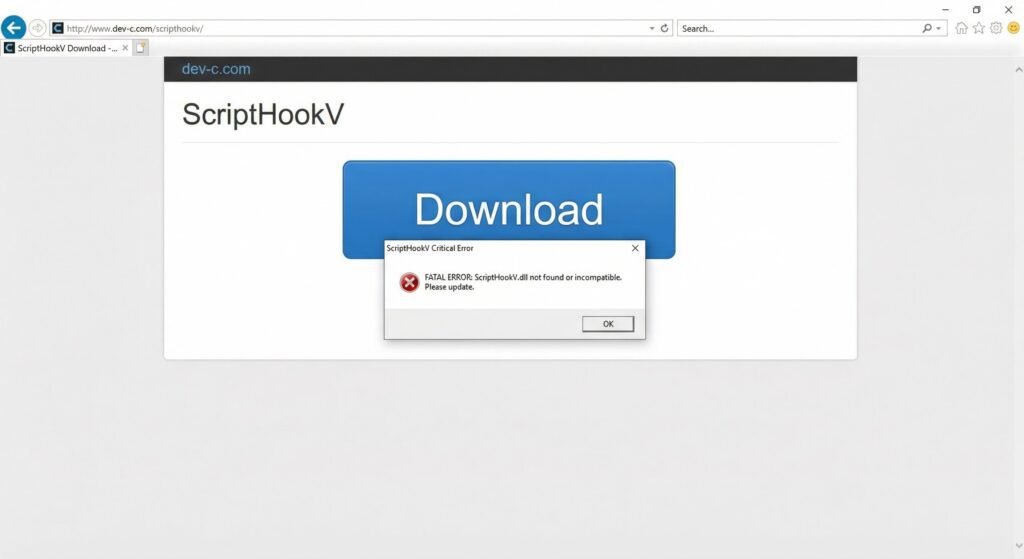
After the January 27, 2026 Rockstar update, players started seeing the “ScriptHookV Critical Error – incompatible game version” message almost instantly.[reddit]
Here is what to do:
- Go to the official Script Hook V website at dev-c.com
- Download the latest
ScriptHookV.dllanddinput8.dll - Replace the old files in your main GTA 5 installation directory
- Relaunch the game
Temporary fix while waiting for an update: Simply remove or rename dinput8.dll from your GTA 5 folder. This disables all mods but lets you play story mode or online without crashing.[youtube]
Fix 2: Replace Your gameconfig.xml
This one quietly fixes more crashes than most people realize. The default gameconfig.xml file that ships with GTA 5 has hard limits baked in — limits for vehicles, peds, prop spawns, and memory allocation. Once you start stacking mods, you hit those limits fast, and the game crashes without explanation.[reddit]
The community-maintained gameconfig for 300+ cars on GTA5-Mods.com is the go-to fix for this. It is updated regularly to match the latest game version, which is critical.[youtube]
Installation steps:
- Download the correct gameconfig version matching your GTA 5 build number
- Open OpenIV in Edit Mode
- Navigate to
mods > update > update.rpf > common > data - Drag and drop the new
gameconfig.xmlto replace the old one - Save and close OpenIV, then relaunch the game[youtube]
Honestly, if you only do one thing from this list, make it this. The stock gameconfig was never designed for heavy modding.
Fix 3: Install the Heap Adjuster and Packfile Limit Adjuster
These two tools work together to expand the memory and file limits the game can access. Think of them as giving GTA 5 a bigger engine to run your mod-heavy session.[youtube]
| Tool | Error It Fixes | Download |
|---|---|---|
| Heap Adjuster | ERR_MEM_EMBEDDEDALLOC_ALLOC (out of memory crashes) | gta5-mods.com [youtube] |
| Packfile Limit Adjuster Enhanced | ERR_FIL_PACK_1 (too many RPF files) | gta5-mods.com [gta5-mods] |
| Heap Limit Adjuster | Fixed 650 MB heap allocation | gta5-mods.com [youtube] |
Installation for both: Drop the .asi and .ini files directly into your main GTA 5 game folder — no OpenIV required.[gta5-mods]
For the Heap Adjuster .ini file, open it and increase the heap value. If you have 16 GB of RAM, a value of 4000 is a solid starting point. For the Packfile Limit Adjuster Enhanced, the default limit is set to 13,000 RPFs, but you can raise it further inside the .ini if crashes continue.[gta5-mods]
Fix 4: Isolate and Remove the Conflicting Mod
Sometimes no amount of gameconfig tweaking will help because the actual problem is a single broken or outdated mod file. One bad .asi plugin can take the whole game down with it, and the crash gives you zero information about why.[youtube]
The elimination method:
- Rename your
scriptsfolder to_scripts— this disables all script mods[reddit] - Launch the game and check if it runs
- If it runs, rename the folder back and start removing mods one by one
- For mods in the
modsfolder via OpenIV, back up the folder entirely and test with a fresh copy - Add mods back in batches to narrow down the offender[youtube]
This takes some patience, not going to lie. But it is the only truly reliable way to track down a rogue mod. Once you find it, check GTA5-Mods.com for an updated version — most popular mods get patched quickly after major Rockstar updates.
Fix 5: Verify Game Files and Update Dependencies
This one gets skipped way too often, but it matters. If your base game files have become corrupted — which can happen after a botched update or a failed mod installation — the game will crash in ways that look exactly like mod conflicts.[youtube]
Steps by platform:
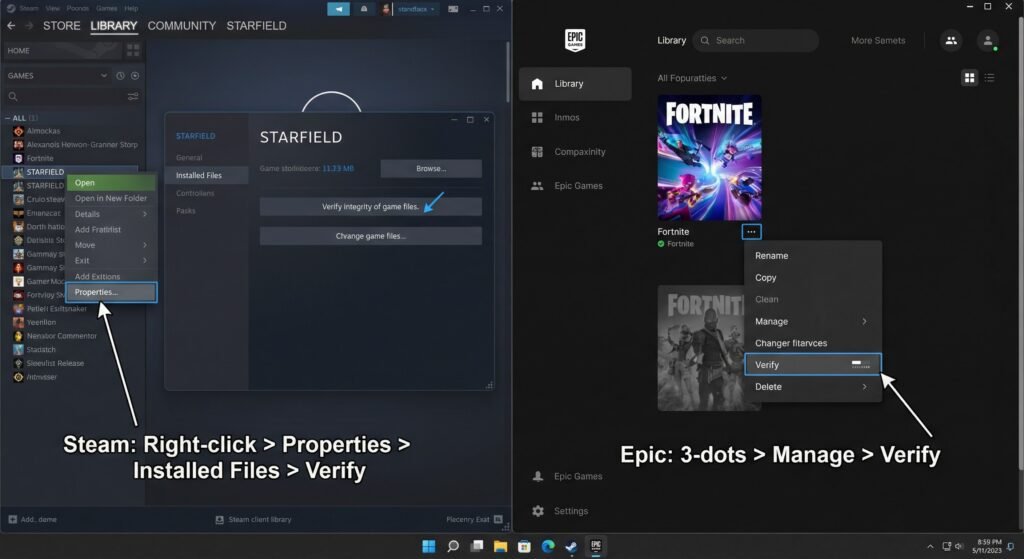
- Steam: Right-click GTA 5 > Properties > Local Files > Verify Integrity of Game Files
- Epic Games: GTA V > three-dot menu > Manage > Verify
- Rockstar Launcher: GTA V > three-dot icon > Verify Integrity
Also update these dependencies, which many mods rely on:[youtube]
- Visual C++ Redistributables (All-in-One)
- .NET Framework
- ScriptHookVDotNet Nightly Build — especially important if you use script mods[youtube]
Run both your game launcher and mod tools as Administrator. It is a small thing but it removes a whole class of permission-related crashes.[youtube]
Quick Crash Diagnosis Reference
Use this table to match your crash symptom to the right fix above:
| Crash Symptom | Most Likely Cause | Go To Fix |
|---|---|---|
| “ScriptHookV Critical Error” popup | Script Hook V version mismatch | Fix 1 [youtube] |
| Silent crash on loading screen | Outdated gameconfig.xml | Fix 2 [reddit] |
| ERR_FIL_PACK_1 error | Too many RPF packfiles | Fix 3 [gta5-mods] |
| ERR_MEM_EMBEDDEDALLOC_ALLOC | Insufficient heap memory | Fix 3 [youtube] |
| Random crash, no error message | Conflicting .asi or mod file | Fix 4 [reddit] |
| Crash after Rockstar update | Corrupted game files or outdated deps | Fix 5 [youtube] |
Modding Best Practices to Prevent Future Crashes
A bit of prevention saves a lot of headaches down the road. These habits will keep your mod setup stable between Rockstar updates:
- Always back up your mods folder before installing anything new — seriously, just zip it and keep it
- Use a mods folder through OpenIV rather than replacing original game files directly[reddit]
- Check mod update dates before installing — a mod last updated in 2022 may not be compatible with current game versions
- Keep your mod list lean — every unused mod is a potential crash waiting to happen[youtube]
- Monitor r/GTAV_Mods and r/GrandTheftAutoV_PC on Reddit — when Rockstar drops an update, these communities immediately flag broken mods and post fixes[reddit]
Get Back Into Los Santos
Modding GTA 5 in 2026 is still absolutely worth it — the community is producing incredible content, and the game has more life in it than ever. But Rockstar updates will keep breaking things, and that is just part of the deal. The five fixes above cover the overwhelming majority of crash scenarios you are likely to encounter.
If you are still stuck after working through all five fixes, drop your crash details in the comments below. Include your GTA 5 version number, which mods you have installed, and the exact error message if there is one. The more specific you are, the faster the community can help.
Have one of these fixes worked for you? Which crash was giving you grief? Leave a comment — it helps other readers find the right solution faster.
Related reading: How to Install OpenIV for GTA 5 | GTA5-Mods.com – The Official Mod Repository