

If you’ve ever tried playing Grand Theft Auto IV on PC and felt something was off, you weren’t imagining it. The PC port of GTA IV has been notoriously broken since launch — plagued with graphical glitches, frame rate issues, broken physics, and audio bugs that Rockstar never fully addressed. Enter Fusion Fix: a free, open-source mod that doesn’t just patch the game — it resurrects it.
What Exactly Is Fusion Fix?
Fusion Fix is a comprehensive, community-built modification for GTA IV: The Complete Edition developed by ThirteenAG and a team of 28 contributors. It aims to fix a wide range of technical issues, restore console-quality visuals, and bring the game up to a standard that modern hardware and displays actually deserve. With over 2,000 GitHub stars and 71 releases, it has become the de facto first mod you install before anything else.
Think of it as the unofficial “Definitive Edition” that Rockstar never delivered.
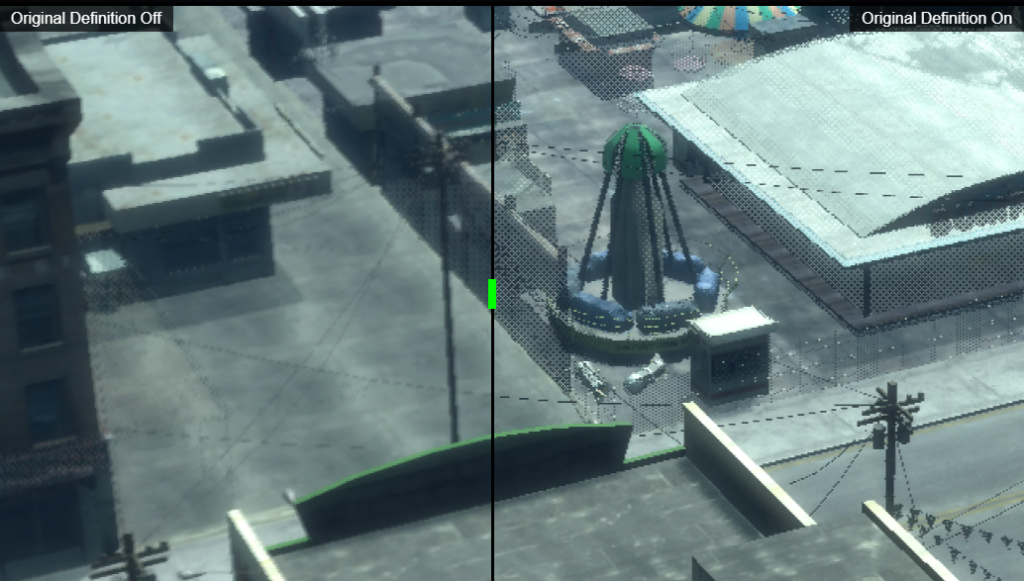
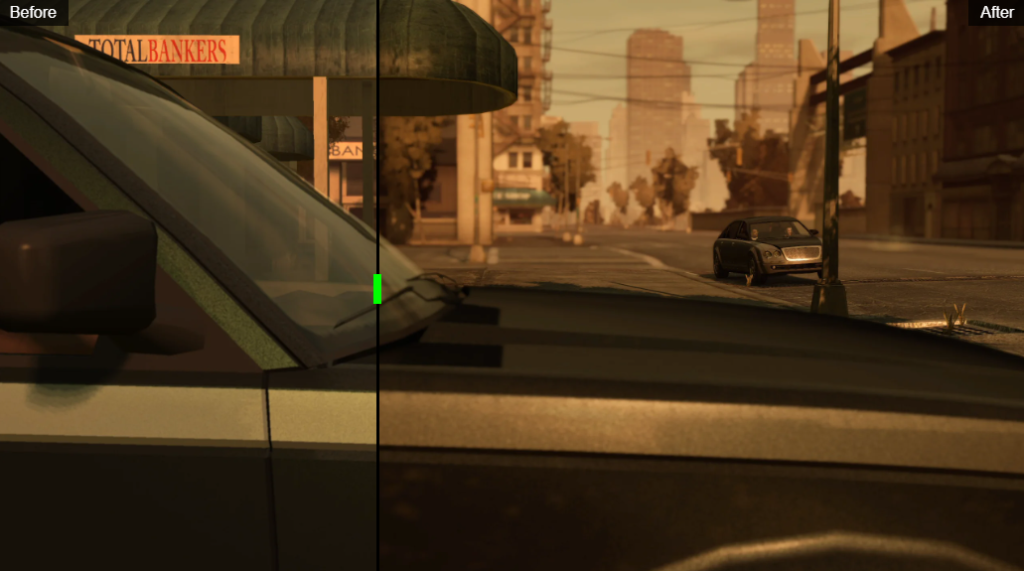
What Fusion Fix Actually Does
- Z-Fighting Fix — Reduces surface clipping.
- Console Gamma & Tone Mapping — Restores richer colours.
- Bloom at 4K — Makes bloom scale properly at higher resolutions.
- Depth of Field — Fixes depth of field at 4K.
- Motion Blur — Keeps blur consistent across frame rates.
- Shadow Overhaul — Improves shadow quality and behaviour.
- Volumetric Fog & Sun Shafts — Adds fog and godrays.
- FXAA and SMAA Anti-Aliasing — Adds anti-aliasing.
- Rain & Water Fixes — Improves rain and water visuals.
- Xbox-style Tree Translucency — Restores sunlight-through-leaves lighting.
- Cutscene Fix — Smooths cutscenes at higher FPS.
- Always Run — Makes running the default.
- Centered Camera — Centers the camera view.
- Raw Mouse Input — Improves mouse responsiveness.
- Extended Sniper Controls — Improves sniper handling.
- Helicopter Bug Fix — Fixes the helicopter physics bug.
- Restored Traffic Cops & Pedestrians — Brings back missing NPCs.
- Skip Intro & Menu — Skips the opening screens.
- FPS Limiter — Adds an in-game frame cap.
- Controller Icons — Updates controller button prompts.
- Seasonal Events — Adds snow and Halloween effects.
- DXVK (Vulkan) Toggle — Switches between DirectX 9 and Vulkan.
New In-Game Menu Options
One of Fusion Fix’s most user-friendly features is that almost all its options are accessible inside the pause menu in real time — no need to manually edit config files. Options are organized under four categories:
| Category | Key Options |
|---|---|
| Display | FOV, Console Gamma, Motion Blur, Depth of Field, Tree Lighting, Screen Filter |
| Graphics | FPS Limiter, FXAA/SMAA, Volumetric Fog, Sun Shafts, Shadow Filter, Vulkan/DX9 |
| Game | Skip Intro, Letterbox/Pillarbox, Windowed/Borderless, Seasonal Events |
| Controls | Always Run, Centered Camera, Gamepad Icons, Raw Input, Centering Delay |
Download Links
Fusion Fix is completely free. Here are the official, verified download sources:
- 🌐 Official Website: fusionfix.io/iv — ZIP download & Offline Installer
- 🐙 GitHub (Source & Releases): github.com/ThirteenAG/GTAIV.EFLC.FusionFix
- 🎮 Nexus Mods: nexusmods.com/gta4/mods/716
- 📖 Gillian’s Modding Guide (step-by-step install): gillian-guide.github.io
Installation (Simple Steps)
Installation takes under five minutes and requires no technical expertise.
- Own a legitimate copy of GTA IV: The Complete Edition via Steam or Rockstar Games Launcher
- Download
GTAIV.EFLC.FusionFix.zipfrom any link above - Extract the ZIP contents directly into your GTA IV root folder (where
GTAIV.exeis located) - Launch the game — Fusion Fix loads automatically
Fusion Fix has become so essential to the GTA IV PC experience that the community now essentially considers it a mandatory first install before any other mod or enhancement. Whether you’re revisiting Liberty City after years away or playing for the very first time, Fusion Fix transforms the PC version into the definitive way to experience Niko Bellic’s story.
