

If you’ve ever joined a FiveM roleplay server and immediately felt like your PC was running on borrowed time — stuttering textures, muddy visuals, and a slideshow of frames — you already know the pain. The default GTA V graphics aren’t exactly optimized for FiveM servers, and low-end PCs get hit the hardest. The good news? A well-configured FiveM graphics pack free download can completely transform your experience without spending a rupee or dollar on new hardware.
In this guide, you’ll find the best FiveM graphics pack options for 2026, including working Discord links, PvP-focused presets, realistic visual mods, and step-by-step installation instructions. Whether you’re on a 4GB RAM laptop or a budget desktop that struggles to hit 30 FPS, this guide is made for you.
Why Your FiveM Graphics Feel Terrible
FiveM doesn’t ship with any visual improvements out of the box. You’re essentially running the base GTA V engine with a multiplayer overlay on top, which means the same washed-out lighting, flat shadows, and dull textures you’ve probably noticed in vanilla GTA V.
A FiveM graphics pack changes that by injecting post-processing effects, ENB-style shaders, ReShade configurations, or custom graphics presets directly into your FiveM client. The result is richer colors, better draw distances, improved lighting, and in many cases — better performance too, because the packs are designed to cut unnecessary rendering load rather than add to it.
The key difference between a FiveM graphics pack for low-end PCs and a high-end one is the balance between visual quality and frame rate. Low-end packs disable expensive effects like depth of field, ambient occlusion, and volumetric fog while enhancing colors and contrast so the game still looks great without killing your GPU.
What to Look for in a FiveM Graphics Pack
Not every pack you find on a random Discord server is worth downloading. Before you install anything, check for these:
- Active support community — A good Discord with regular updates is a sign the pack is maintained
- Low-end PC compatibility — Listed specs and FPS results from real users matter
- ReShade or NVE base — These are stable foundations rather than shady custom executables
- No modmenu bundled — Never install a pack that includes a menu mod — that’s a ban risk
- Clear install instructions — If the readme is confusing, skip it
Best FiveM Graphics Packs to Download in 2026
1. QuantV FiveM Edition (Best Overall)
QuantV is arguably the most polished graphics overhaul available for FiveM. It uses a combination of custom shaders, edited weather files, and ENB-inspired lighting to completely change how the game feels. The FiveM-compatible build strips out the components that conflict with server-side scripts and focuses purely on visual enhancement.
It’s free, regularly updated, and has a massive Discord community where users share server-specific configs.
Recommended for: Mid to high-end PCs (GTX 1060 and above) Expected FPS gain on optimized settings: Neutral to +10 FPS depending on config
2. NaturalVision Evolved (NVE) – FiveM Compatible Build
NaturalVision Evolved is the gold standard of GTA V graphics mods, and its FiveM-compatible version is a clean, server-safe build that works with most RP servers. It reworks weather, lighting, time-of-day cycles, water effects, and ambient colors without touching anything server-side.
The performance impact is real on budget machines, but NVE comes with preset quality levels — Low, Medium, and High — so you can tune it to your PC. The Low preset still looks dramatically better than vanilla GTA V.
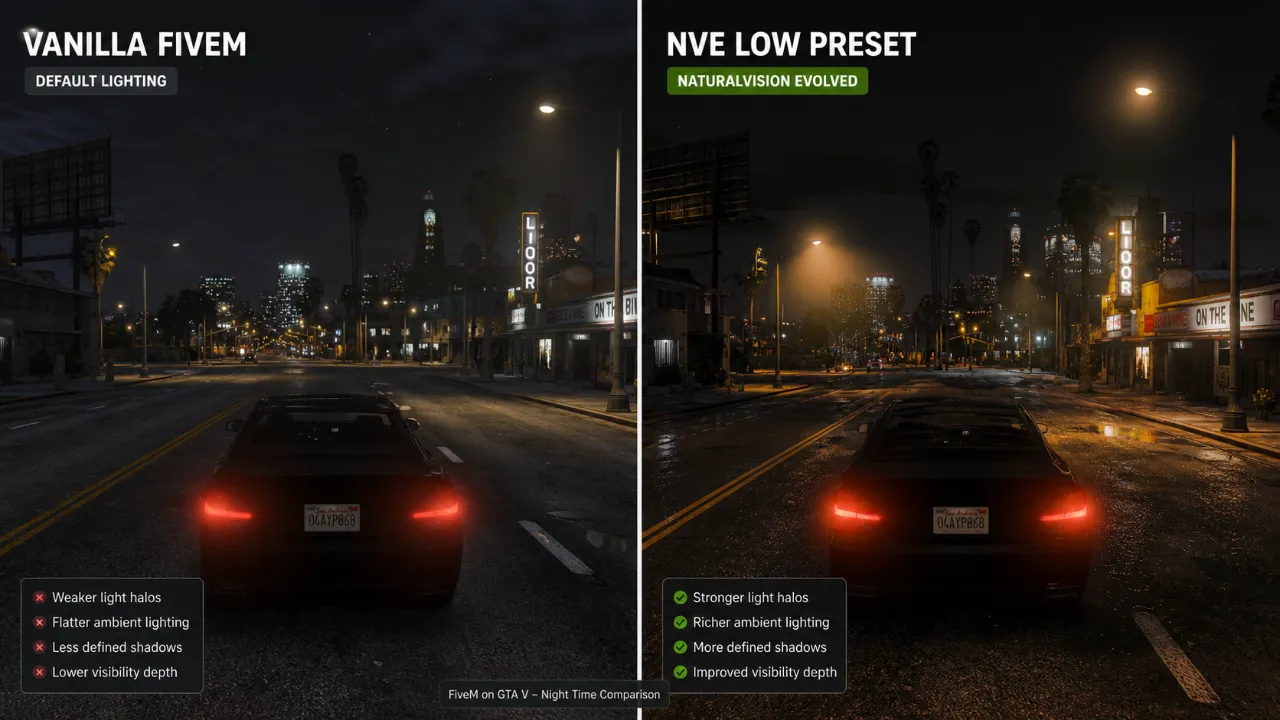
Recommended for: Any PC with a dedicated GPU (even a GT 1030) Expected FPS on Low preset: 45–60 FPS on mid-tier hardware
If you want to get the most out of NVE, check out our deep dive on how to fix FPS drops in games after you install it — the same principles apply inside FiveM.
3. FiveM ReShade Pack (Best Free Option for Low-End PCs)
ReShade is a post-processing injector that works on top of your existing GTA V installation. Community-made ReShade presets for FiveM are completely free, extremely lightweight, and toggle on or off with a single key press during gameplay.
The best presets for low-end PCs focus on color grading, sharpening, and mild ambient occlusion — effects that cost almost nothing performance-wise but make the game look noticeably cleaner and more vibrant.
Popular community presets circulate through dedicated FiveM graphics pack Discord servers. The most reliable one to find active presets right now is the GTA5-Mods forum and the FiveM forums, both of which host verified downloads.
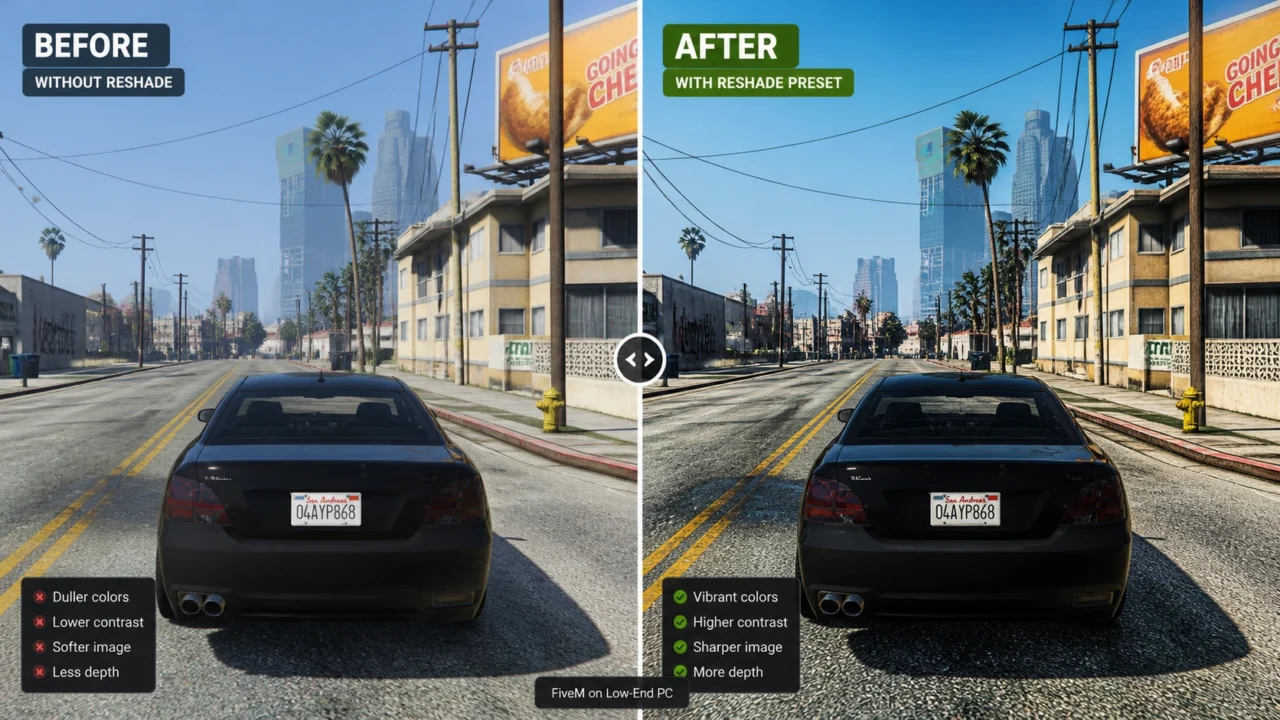
Recommended for: PCs with 4GB RAM or integrated graphics Performance impact: -2 to +5 FPS (virtually free)
4. PvP-Optimized FiveM Graphics Pack
If you’re playing competitive FiveM servers — DM, PvP, or racing — you don’t want cinematic lighting that hides enemies in dark corners. PvP-focused FiveM graphics packs are designed with visibility as the priority: brighter shadows, reduced environmental fog, cleaner distant textures, and a slightly flatter color palette that makes player models easier to spot.
These packs are usually shared inside specific FiveM realistic graphics pack Discord servers tied to the server you play on. Ask in your server’s mod channel or general chat — many established RP and DM servers have an official pack that their staff recommends.
The typical PvP pack is a ReShade preset combined with a custom visualsettings.dat file and sometimes a tweaked timecycle folder.
How to Install a FiveM Graphics Pack (Step-by-Step)
Installing most packs follows the same basic process regardless of which one you choose. Here’s how to do it cleanly without breaking anything.
Step 1: Back Up Your FiveM Folder
Before touching anything, back up your existing FiveM citizen folder. Copy it somewhere safe. If something goes wrong, you can restore it in 30 seconds.
Step 2: Install ReShade (If Required)
- Download ReShade from the official site
- Run the installer and point it at your
FiveM.exeorGTA5.exedepending on the pack’s instructions - Select DirectX 10/11/12 when prompted
- Let it install the default shaders — you’ll replace them with the pack’s preset next
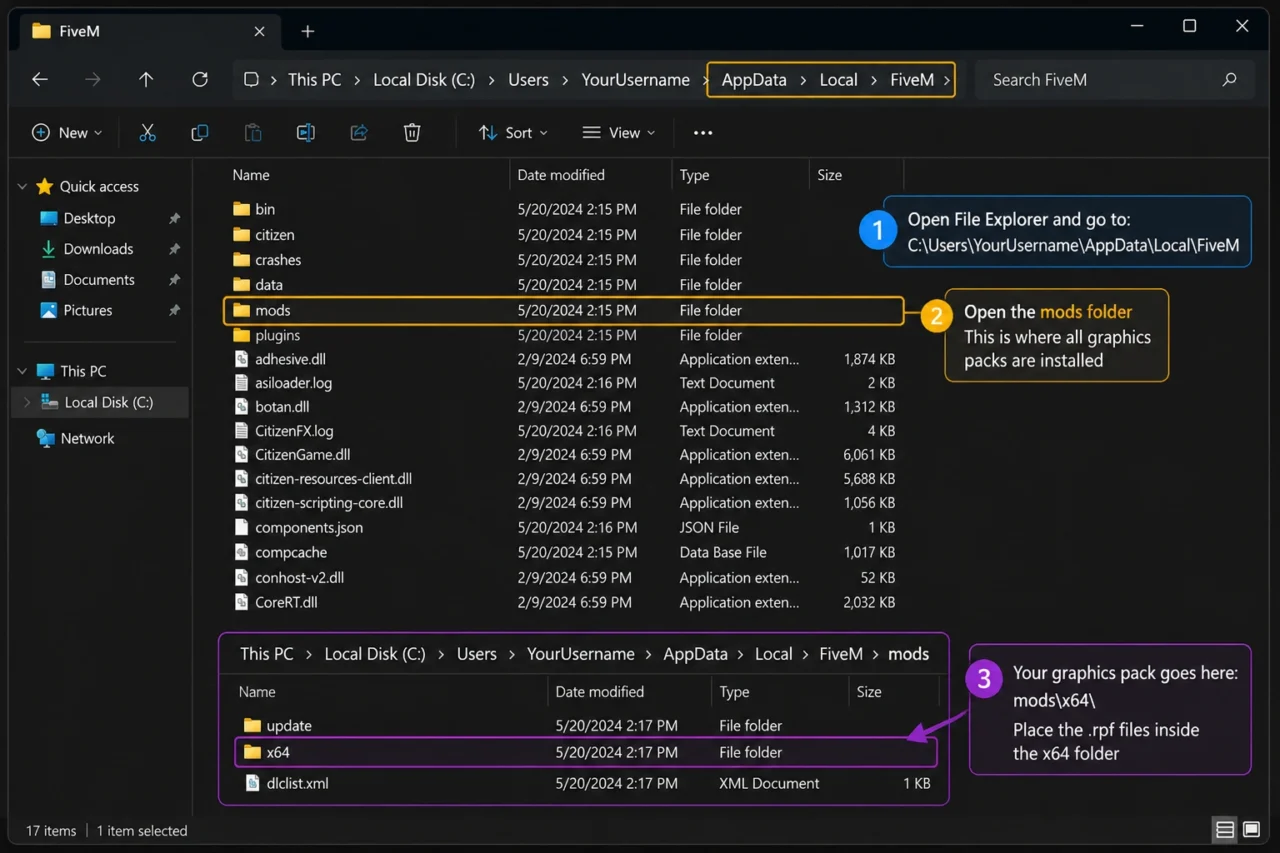
Step 3: Drop the Pack Files in the Right Place
Most packs include a folder structure in the readme. Common locations are:
- ReShade preset files (
.ini) go in your GTA V root folder visualsettings.datgoes inFiveM\FiveM.app\citizen\common\data\- ENB files go directly in the GTA V root folder
- Timecycle mods go in
FiveM\FiveM.app\citizen\common\data\timecycle\
Step 4: Configure In-Game Settings
Once the pack is installed, launch FiveM and go into GTA V graphics settings. For low-end PCs, set these as your baseline:
- Texture Quality: Normal
- Shadow Quality: Normal
- Grass Quality: Off or Normal
- Reflection Quality: Normal
- PostFX: Normal
- MSAA: Off (use FXAA instead)
- Extended Distance Scaling: 0%
This baseline, combined with a ReShade preset doing the heavy lifting visually, gives you the best ratio of looks to performance.
Step 5: Adjust ReShade In-Game
Press Home to open the ReShade overlay while in FiveM. Load your preset .ini file and tweak the sharpening and color correction sliders to taste. Toggle it off with the same key to compare.
For a broader performance boost alongside your new graphics pack, these Windows 11 gaming tweaks will squeeze extra FPS out of your system — completely free.
Common FiveM Graphics Pack Problems and Fixes
Pack causes FiveM to crash on launch: This usually means a conflicting d3d11.dll or dxgi.dll file. Remove any ENB files from your GTA V root folder and keep only the ReShade files.
Colors look washed out after installing: Open ReShade and confirm the correct preset is loaded. Many packs ship with multiple .ini files for different weather styles.
FPS dropped significantly after install: Disable depth of field and ambient occlusion in the ReShade overlay. These two effects are the biggest performance killers on low-end machines.
Server kicks you for modified files: Some anti-cheat systems flag specific file modifications. Stick to ReShade presets and visualsettings.dat only — never modify game executable files or script hooks inside FiveM.
If you’re still struggling with CPU spikes alongside your new pack, this guide on how to reduce CPU usage while gaming covers exactly what to do.
Best In-Game Settings to Pair with Your Graphics Pack
The pack does the visual work, but your in-game settings determine whether you can actually play at a stable frame rate. Here’s a quick reference table:
| Setting | Low-End PC | Mid-Range PC |
|---|---|---|
| Texture Quality | Normal | High |
| Shadow Quality | Normal | High |
| MSAA | Off | 2x |
| PostFX | Normal | Very High |
| FXAA | On | On |
| Grass Quality | Off | Normal |
| Reflection Quality | Normal | High |
| Extended Distance | 0% | 25% |
For GPU-specific driver optimizations that compound these gains, our guide on NVIDIA and AMD FPS settings is a solid companion read.
Disclaimer
Disclaimer: The tips, mods, and tools shared on this site are for informational purposes only — results may vary depending on your PC hardware and software configuration. OptiLag is not responsible for any data loss, system instability, or damages that may arise from following the guides or downloading third-party files.
Final Thoughts
A good FiveM graphics pack doesn’t have to cost anything or require a powerful PC to make a real difference. Whether you grab a free ReShade preset from the community, go full NaturalVision Evolved on a mid-range rig, or hunt down a PvP-focused visibility preset from a FiveM graphics pack Discord server, the visual upgrade is immediate and satisfying.
Start with the free ReShade route if you’re on a low-end machine — it’s zero risk, instantly toggleable, and genuinely transforms how FiveM looks. If you have a bit more headroom, NVE’s Low preset is the best dollar-per-visual-improvement ratio you’ll find anywhere.
Your next step: Install ReShade, drop in a community preset, and jump into a FiveM server. If your FPS dips, head over to our best free gaming optimizer software guide to clean up your system before your next session.
Got a pack that works great on your machine? Drop the Discord link or preset name in the comments — the community always appreciates a real recommendation from a real player.
