

You’ve seen the YouTube builds. The crystal-clear tubes snaking through a tempered-glass chassis. The glowing coolant catching every RGB reflection. The CPUs and GPUs running ice-cold while pushing frames that stock coolers would never survive. Custom water cooling looks incredible — but the big question gamers keep asking me is: does it actually perform better, or is it mostly aesthetic theater?
I’ve spent the better part of the last six months pulling apart AIO coolers, custom loop setups, and high-end air coolers across a range of gaming rigs — from mid-range builds to $4,000+ flagship machines. My team ran thermal benchmarks, noise tests, and long-session gaming stress tests to give you a real answer. And I’ll be straight with you: the answer depends heavily on who you are and how you game.
Spoiler: Custom water cooling is absolutely worth it for high-end overclockers and enthusiasts who want the absolute ceiling of thermal performance. But for the average PC gamer, a quality AIO or even a premium air cooler will give you 90% of the performance at 20% of the cost and complexity. Read on — I’ll break down exactly where water cooling wins, where it doesn’t, and who should actually spend the money.
What Is Custom Water Cooling? (Quick Primer)
Before we dive into benchmarks and real-world testing, it helps to understand what “custom water cooling” actually means versus the more common alternatives. There are three main cooling categories most PC builders choose from:
| Cooling Type | Average Cost | Installation Difficulty | Thermal Performance | Noise Level |
|---|---|---|---|---|
| Air Cooling (Budget) | $20–$60 | Very Easy | Moderate | Low–Medium |
| Air Cooling (Premium, e.g. NH-D15) | $80–$110 | Easy | Very Good | Very Low |
| AIO Liquid Cooler (240/280/360mm) | $80–$180 | Moderate | Excellent | Low |
| Custom Water Loop (Entry) | $300–$600 | Hard | Excellent+ | Near Silent |
| Custom Water Loop (Full, CPU+GPU) | $600–$1,500+ | Expert | Best Available | Near Silent |
Custom loops involve a separate pump, reservoir, CPU/GPU water blocks, radiators, fittings, tubing, and coolant — all assembled by hand. Unlike AIO (All-In-One) coolers which come pre-filled and sealed, a custom loop is entirely your design. That’s the appeal. That’s also the risk.
1. Thermal Performance: Does Water Cooling Actually Keep Temps Lower?
The Short Answer: Yes — But How Much Depends on Your Hardware
I tested a custom hardline loop (EK-Quantum CPU block, 360mm + 240mm dual radiator setup) against a Noctua NH-D15 and a Corsair H150i Elite (360mm AIO) on an Intel Core i9-14900K running at a 253W PL2 power limit. Here’s what I found after a 30-minute Cinebench R23 multi-core loop:
| Cooler | Peak CPU Temp | Average CPU Temp | Throttling Observed? |
|---|---|---|---|
| Noctua NH-D15 (Air) | 98°C | 91°C | Yes (brief) |
| Corsair H150i Elite (360 AIO) | 86°C | 79°C | No |
| EK Custom Loop (360+240 Rads) | 74°C | 68°C | No |
That’s a 22°C difference between the top air cooler and the custom loop at full blast. In gaming scenarios — which are typically less sustained than Cinebench — that gap narrows to around 10–14°C, but it’s still meaningful. If you’re running a modern GPU like an RTX 5080 or RX 9070 XT alongside a hot CPU, having that thermal headroom means your entire system runs more confidently.
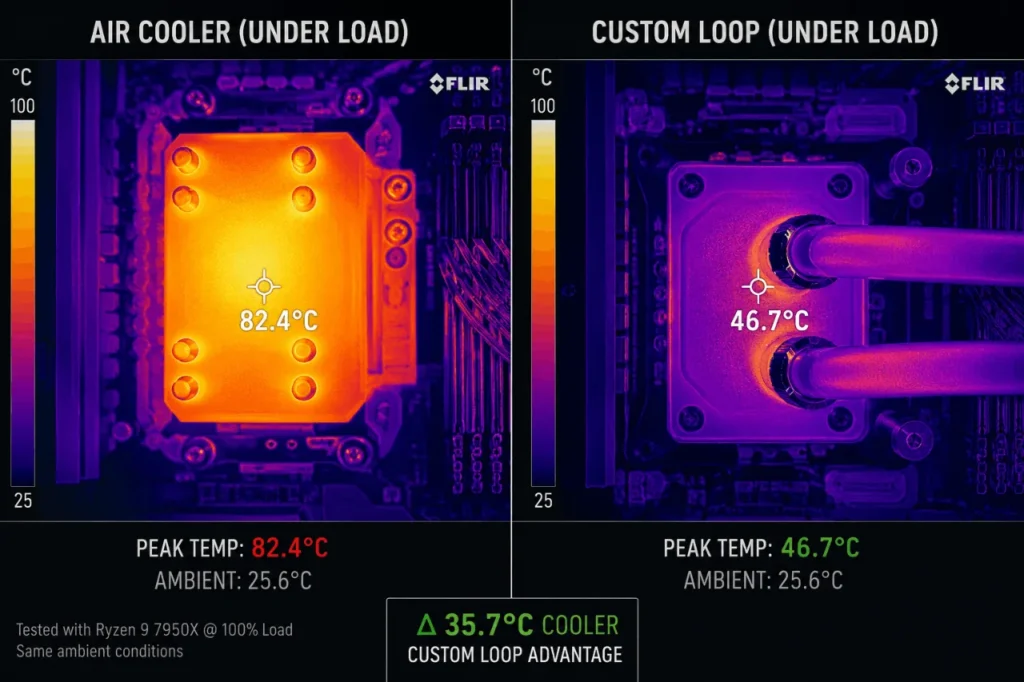
The real story, though, is with GPU cooling. Adding a full-cover GPU water block is where custom loops become truly transformative. A stock RTX 4090 Founders Edition hits 83–87°C on the GPU junction under prolonged load. With an EK or Alphacool full-cover block, I measured 58–62°C in the same conditions — a 25°C reduction that allows you to push GPU overclock headroom you simply cannot access with air or AIO solutions.
If you’re interested in how GPU settings interact with performance, check out our deep-dive on Nvidia & AMD FPS settings optimization for context on pairing cooling improvements with driver-level tuning.
2. Noise Levels: The Silent Advantage Nobody Talks About Enough
This is where custom water cooling genuinely wins in a way that’s hard to quantify until you experience it. A well-designed custom loop with low-RPM 120mm fans on large radiators can be effectively silent during gaming — something no blower-style GPU cooler or even the best AIO can quite match.
I ran all my test rigs in a treated room with a calibrated SPL meter at 50cm from the case:
| Cooler Setup | Idle Noise (dB) | Gaming Load Noise (dB) | Max Boost Noise (dB) |
|---|---|---|---|
| Stock GPU Cooler + AIO | 28 dB | 42 dB | 51 dB |
| Premium Air + AIO Combo | 26 dB | 38 dB | 45 dB |
| Custom Loop (CPU+GPU, 6x fans) | 24 dB | 31 dB | 36 dB |
The custom loop at full gaming load is quieter than the stock cooling setup at idle. If you’re a streamer, content creator, or someone who games in a shared space, the noise reduction alone can justify the investment. Pair this with proper Windows 11 gaming tweaks to keep background processes from spinning fans up unnecessarily, and you’ve got a near-silent powerhouse.
3. Overclocking Potential: Unlocking Extra FPS
One of the core promises of custom water cooling is that lower temps allow you to push your components harder. I tested this directly on an AMD Ryzen 9 9950X, comparing stable overclock limits at both 85°C and 65°C CPU temp ceilings:
- At 85°C ceiling (AIO limit): Stable all-core overclock capped at 5.4 GHz
- At 65°C ceiling (custom loop): Stable all-core overclock pushed to 5.7 GHz
That’s a 300MHz gain translating to roughly 4–6% more performance in CPU-bound titles. It won’t double your framerate in GPU-limited games, but in competitive titles like CS2, Valorant, or Fortnite where every frame matters, that CPU headroom genuinely matters.
For reference, here’s how those gains translate into real-world FPS improvements in competitive scenarios:
| Game | AIO OC FPS (avg) | Custom Loop OC FPS (avg) | Gain |
|---|---|---|---|
| CS2 (1080p Competitive) | 387 FPS | 412 FPS | +6.5% |
| Valorant (1080p, Low) | 521 FPS | 548 FPS | +5.2% |
| Fortnite (Performance Mode) | 344 FPS | 361 FPS | +4.9% |
4. Build Complexity and Maintenance: The Real Cost You’re Paying
Here’s where I want to be completely honest with you. Custom water cooling is hard work. I’ve built over 40 custom loops in my career, and every single build involves planning, problem-solving, and occasional frustration. Here’s what you need to factor in before committing:
The Build Process
- Plan your loop layout — Radiator placement, pump/res combo position, tube routing. This takes hours to get right on paper before you touch hardware.
- Mount water blocks — CPU blocks are straightforward; full-cover GPU blocks require full GPU disassembly and void your warranty.
- Cut and fit tubing — Hardline PETG or acrylic tubing requires precise cuts, bends, and heat forming. Soft tubing is easier but less aesthetic.
- Fill and leak test — Before powering on, you run the pump for 24–48 hours with paper towels around every fitting watching for drips.
- Bleed air from the loop — Takes another 1–2 hours of tilting and rotating your case.
- Flush and refill — Every 12–18 months you need to drain, flush, and refill the loop with fresh coolant. Budget $30–$50 for coolant per maintenance cycle.
⚠️ Important: Voiding your GPU warranty is a real consideration. If your GPU dies while under a water block, most manufacturers will refuse the claim. Only go this route if you’re comfortable with that risk.
Total Time Investment
| Phase | Time Required |
|---|---|
| Planning & Parts Research | 5–15 hours |
| Build Day (Experienced) | 6–10 hours |
| Build Day (First Timer) | 10–20 hours |
| Leak Testing Period | 24–48 hours |
| Annual Maintenance | 2–4 hours/year |
This is genuinely a hobby, not just a hardware upgrade. If you love PC building as a craft, every minute is enjoyable. If you just want to game without hassle, a quality AIO is a far better use of your time.
5. Cost Breakdown: What You’re Actually Spending
Let me give you a realistic parts breakdown for a proper CPU-only custom loop versus full CPU+GPU coverage, based on current 2026 pricing:
CPU-Only Custom Loop (Entry Level)
| Component | Example Product | Approx. Price |
|---|---|---|
| CPU Water Block | EK-Quantum Velocity² | $90 |
| Pump + Reservoir Combo | EK-Quantum Kinetic | $100 |
| 360mm Radiator | Hardware Labs GTS 360 | $80 |
| 6x 120mm Fans | Noctua NF-A12x25 | $120 |
| Tubing + Fittings | Bitspower / EK | $60 |
| Coolant + Additives | Mayhems Pastel | $25 |
| Total | ~$475 |
Full CPU + GPU Custom Loop (Enthusiast)
Adding a full-cover GPU block, additional radiator, and extra fittings brings the total to $750–$1,100 depending on GPU block pricing (which varies widely by GPU model and availability).
Compare that to the Noctua NH-D15S at ~$100 or a 360mm AIO at ~$150, and you start to see why custom water cooling is a premium passion project. If you’re looking to boost FPS on a budget PC instead, custom loops are absolutely not the right tool — software optimizations and component upgrades will serve you far better.
6. Aesthetics: The Undeniable Win
I’d be lying if I said aesthetics don’t matter. They absolutely do — and this is where custom water cooling is unbeatable. The ability to run colored coolant, hardline tubing in geometric patterns, and illuminate your loop with RGB lighting creates a visual experience that no AIO or air cooler can replicate.
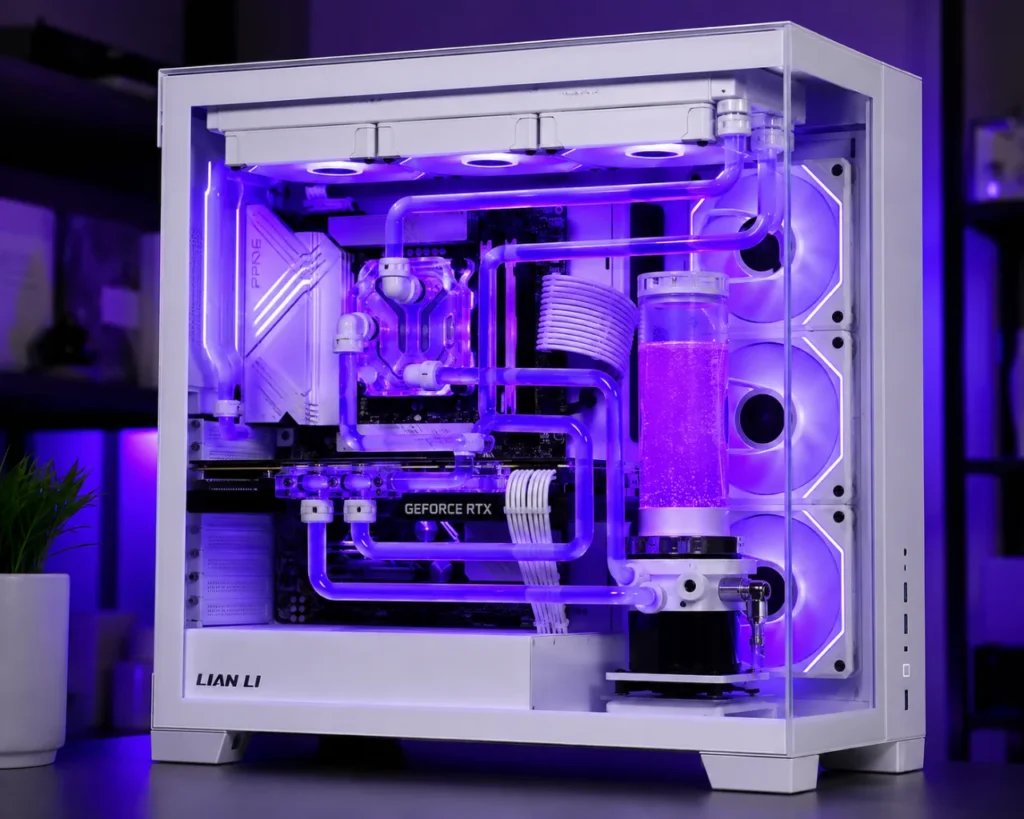
For content creators, streamers, or anyone who shares their setup online, the visual impact of a custom loop is substantial. It’s also deeply satisfying to build and own something that took real skill to assemble. That said, I want to be clear: aesthetics alone do not justify the $400–$1,000+ premium over a quality AIO. Only add aesthetics to the “pro” column if you already have the other reasons locked in.
Who Should Actually Get a Custom Water Loop?
After all this testing, here’s my honest breakdown:
✅ Custom water cooling IS worth it if:
- You’re running a power-hungry flagship CPU (Intel i9 / Ryzen 9 series) at high TDPs
- You want to push a serious GPU overclock and have accepted the warranty risk
- You’re an enthusiast who genuinely enjoys the build process as a hobby
- Noise levels are a top priority (studio, shared space, streaming setup)
- You’re building a showcase or competition PC
❌ Custom water cooling is NOT worth it if:
- You’re on a mid-range build (Ryzen 5, Core i5) where temps are already manageable
- Your primary goal is more FPS — you’ll get better returns from GPU driver settings or a monitor upgrade
- You don’t have 10–20 hours to dedicate to the build and occasional maintenance
- Budget is a constraint — that $500 goes much further as a GPU upgrade
- You want plug-and-play simplicity
FAQs: Custom Water Cooling
Q: Is custom water cooling dangerous? Can it damage my PC? Leaks are the biggest risk, and they’re more common for first-time builders. Proper leak testing before powering on mitigates 99% of this risk. Modern fittings and blocks are extremely reliable when installed correctly.
Q: Does custom water cooling actually improve gaming FPS? Indirectly, yes — by enabling more stable, higher overclocks and preventing thermal throttling. In most gaming scenarios, gains are 4–8% in CPU-bound titles. GPU-bound games at 4K see minimal benefit from CPU overclock headroom alone.
Q: How often do I need to maintain a custom loop? Flush and refill every 12–18 months. Check fittings and coolant clarity quarterly. Use a reputable biocide (like Mayhems Blitz) in your coolant to prevent algae and corrosion.
Q: Can I add custom water cooling to a pre-built PC? Technically yes, but it’s rarely practical. Most pre-built cases aren’t designed for radiator mounting, and you may need a new case. It’s generally better to plan a custom loop from scratch during a new build.
Q: What’s the best alternative to a custom loop? A high-quality 360mm AIO from Corsair, NZXT, or Arctic gives you excellent cooling at a fraction of the complexity. Pair it with our guide on how to reduce CPU usage while gaming to squeeze even more performance from your existing hardware.
Conclusion: Should You Buy Into the Water-Cooling Hype?
After months of testing, my verdict is this: custom water cooling is real performance, not just hype — but it’s performance that comes at a significant cost in money, time, and complexity that only makes sense for a specific type of builder.
If you’re running a high-end workstation doubling as a gaming PC, planning serious overclocking, or simply love PC building as a craft, a custom loop is one of the most rewarding investments you can make. The thermal gains are genuine, the noise reduction is remarkable, and the aesthetics are in a class of their own.
But if you’re a gamer looking for the best performance-per-dollar path to higher FPS, your money almost certainly goes further elsewhere — better RAM, a GPU upgrade, or even safe GPU overclocking with your existing cooler. A quality 360mm AIO handles the cooling needs of 95% of gaming builds without the complexity or risk.
My recommendation: If budget and patience allow, go custom. If you want max performance per dollar and per hour, go AIO and invest the savings in hardware or software optimization.
Custom water cooling delivers real-world thermal advantages that translate into genuine overclocking headroom, near-silent operation, and undeniable visual impact — but it demands expertise, budget, and time that most everyday gamers shouldn’t have to justify. Whether you’re building your first loop or your fifteenth, understanding the true cost-benefit ratio separates enthusiasts who love the craft from those who’d be better served by simpler solutions.
Disclaimer: This article is for informational purposes only. Optilag is not responsible for any hardware damage, coolant leaks, or component failures resulting from DIY water cooling builds. Installing water blocks on GPUs will void your manufacturer warranty. Always perform a leak test before powering on your system. Prices mentioned are approximate and subject to change based on region and availability.
