
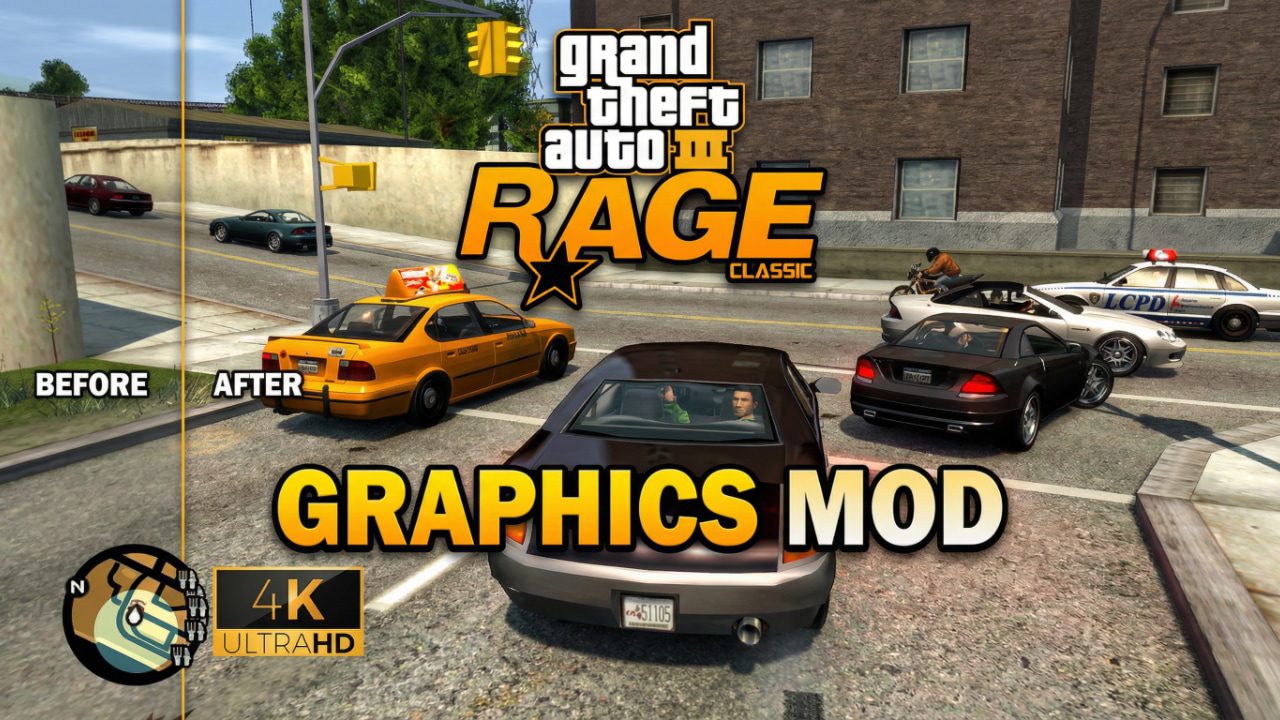
Discover how the GTA 3 Rage Graphics Mod transforms the 2001 classic. Our hands-on review covers installation, visual upgrades, and why this mod beats the Definitive Edition.

I still remember the first time I loaded up Grand Theft Auto III back in 2001. That dark, rainy atmosphere of Liberty City was mind-blowing at the time. But let’s be real—trying to play the original version on a 4K monitor today is a rough experience. The textures look like smeared mud, and the draw distance is basically non-existent.
While Rockstar gave us the “Definitive Edition,” many of us in the modding community felt it missed the mark. That’s where the GTA 3 Rage Graphics Mod comes in. It’s a project born out of a desire to see Claude’s world running on a modern engine with actual grit, rather than the “cartoonish” look of the official remasters.
What Exactly is the GTA 3 Rage Graphics Mod?
If you aren’t deep into the technical side of modding, “Rage” refers to the Rockstar Advanced Game Engine. This is the powerhouse behind GTA IV, GTA V, and Red Dead Redemption 2.
The goal of this mod isn’t just to add a few shiny reflections. It’s a massive undertaking to port the assets, map, and “vibe” of GTA 3 into the engine architecture used by GTA IV. When you play it, the physics feel weightier, the lighting is dynamic, and the city finally feels alive again. It feels like the game GTA 3 was always meant to be if the technology had existed back then.
Key Visual Enhancements
- Dynamic Lighting and Shadows: Unlike the static lighting of the original, the Rage engine allows for real-time shadows from streetlights and headlights.
- Physically Based Rendering (PBR): Materials look “correct.” Metal looks like metal, and wet pavement actually reflects the neon signs of Red Light District.
- Improved Draw Distance: You can finally see across the water to Staunton Island without the “blue fog” hiding everything.
- Euphoria Physics: This is the big one for me. Seeing NPCs react to car impacts using the GTA IV physics engine adds a layer of realism that the original game never had.
Technical Comparison: Original vs. Rage Mod vs. Definitive Edition
I put together this table based on my recent playthroughs. It’s interesting to see where the mod actually outperforms the official $60 product.
| Feature | Original (2001) | Definitive Edition | Rage Graphics Mod |
| Physics Engine | Basic Arcade | Updated RenderWare | Full Euphoria/Rage |
| Atmosphere | Gritty/Dark | Vibrant/Saturated | Gritty/Modern |
| Character Models | Low Poly | “Smooth” Stylized | High Detail / GTA IV Style |
| Stability | High | Mixed | Requires Tuning |
| Weather Effects | Basic Sprites | Improved (but controversial) | Realistic Volumetric |
Personal Observation: There’s something about the way the rain looks in the Rage mod that just hits different. In the Definitive Edition, the rain sometimes looked like white lines blocking the screen. Here, it feels like it’s actually soaking the city.
How to Install the Mod (The “Don’t Break Your Game” Guide)
Installing heavy-duty total conversions can be a headache. I’ve crashed my game more times than I can count, so take it from me: backup your files first.
- Start with a Clean Slate: Make sure you have a fresh installation of the base game (usually GTA IV or the specific version required by the mod build).
- Download the Essentials: You’ll likely need the Script Hook IV and an ASI loader. These are the “bones” that allow mods to run.
- The Mod Files: Download the latest version of the GTA 3 Rage project from reputable community hubs like GTAInside or ModDB.
- Drag and Drop: Most of these files will go directly into your main directory. If it asks to overwrite files, say yes (assuming you made that backup!).
- Adjust the Commandline: Create a
commandline.txtin your folder to help with memory allocation—the Rage engine is notorious for being a bit of a resource hog on PC.
Recommended System Specs
Don’t let the “GTA 3” name fool you. Because this runs on the GTA IV framework, it’s surprisingly demanding.
- GPU: At least a GTX 1660 or equivalent for 1080p.
- RAM: 8GB minimum (16GB preferred).
- CPU: Modern Quad-core (the Rage engine loves a fast clock speed).
GTA 3 Rage Graphics Mod for Low-End PC
One of the biggest misconceptions I see in the modding community is that you need a NASA supercomputer to run this mod. While it’s true that the Rage engine is more demanding than the original 2001 code, it is incredibly scalable. If you’re rocking a low-end PC, you can still get this running by being smart with your settings.
The trick is focusing on “performance over fluff.” You don’t need ultra-realistic motion blur or 8x anti-aliasing to enjoy the updated physics and geometry. By tweaking the configuration files, you can get that modern Liberty City feel even on hardware that’s a few years old.
Optimized Settings for Older Hardware
- Resolution Scale: Dropping this slightly below your monitor’s native resolution can provide a massive frame rate boost.
- Shadow Quality: Set this to “Low” or “Medium.” The Rage engine’s real-time shadows are the biggest performance killer.
- Texture Budget: Keep this within your VRAM limits to avoid those annoying stuttering fits during high-speed chases.
GTA 3 Rage Graphics Mod Download PC: 1GB vs. 2GB RAM
I noticed a lot of people searching for versions that run on 1GB or 2GB of RAM. I’ll be honest with you: running the full Rage conversion on 1GB of RAM is going to be a struggle. The engine itself usually wants more breathing room just to load the assets.
However, if you’re on a 2GB system, it’s “playable” if you use a highly compressed version of the mod. These versions often strip out uncompressed audio or high-res textures that the original modders included.
- The 1GB Experience: You’ll likely see a lot of “texture popping” where buildings disappear and reappear. It’s a bit immersion-breaking, but if it’s all you have, it works.
- The 2GB Experience: This is the sweet spot for older laptops. With a good page file setup in Windows, you can actually get a stable 30 FPS.
My Advice: If you are truly limited by RAM, look for “Lite” texture packs specifically designed for the Rage engine. They swap the 4K textures for 512p or 1024p versions which look great but don’t choke your system.
Can You Play GTA 3 Rage Without a Graphics Card?
This is a tough one. When people ask about playing without a graphics card, they usually mean using Integrated Graphics (like Intel HD or AMD Vega).
Yes, it is possible, but you have to manage your expectations. Modern integrated chips handle the Rage engine quite well. If you’re on an older Intel chip from 2015, you’re going to need to lean heavily on those “low-end” optimization mods.
Pro-tip for Integrated Graphics users: Force the game to run in DirectX 9 mode if possible, as older integrated chips often handle it better than DX11 or DX12 wrappers. Also, make sure your system BIOS has allocated the maximum amount of “Shared Memory” to your internal GPU. It makes a world of difference when the engine tries to load those new Liberty City street textures.
Why Choose This Over the Official Remaster?
I get asked this a lot. Why go through the trouble of modding when you can just buy the game on Steam?
To be honest, it’s about artistic integrity. The original GTA 3 had a specific, oppressive atmosphere inspired by films like The French Connection. The official remaster lost some of that “soul” by making everything too bright and clean. The Rage Graphics Mod retains the gloom. It feels like Liberty City is a place where you’d actually get mugged in an alleyway, which is exactly the point.
The Verdict: Is It Worth It?
If you’re a purist who wants to experience Liberty City with 2026-level fidelity, the GTA 3 Rage Graphics Mod is a must-try. It’s not just a coat of paint; it’s a total engine transplant that gives the game a second life.
It takes a bit of “tinkering” to get it perfect, but that’s half the fun of PC gaming, isn’t it? Once you see the sunrise over the Callahan Bridge with modern shaders, you’ll find it very hard to go back to the vanilla version.
What do you think? Does the Rage engine fit the vibe of GTA 3, or do you prefer the original’s chunky, nostalgic look? Let me know in the comments below!
Would you like me to find a specific “Lite” configuration file you can copy-paste to help boost your FPS on a low-end system?