
Does your operator refuse to peek? Does your Vandal spray feel delayed? 🛑 There is nothing more frustrating in a tactical shooter like Valorant than losing a duel due to high ping, packet loss, or jitter. While Riot Games has optimized Valorant for low-end hardware, network instability remains the #1 enemy of competitive rank climbing.
This professional guide covers how to eliminate lag in Valorant using ExitLag, complete with optimization settings, comparisons, and safety ratings.
📉 Understanding the Enemy: Why Valorant Lags
Before fixing the issue, we must identify it. In Valorant, “lag” usually falls into two categories:
- Network Lag (High Ping/Packet Loss): Your shots don’t register, or you teleport (rubberbanding). This is an internet routing issue.
- Input Lag (Low FPS): The game feels choppy or slow. This is a hardware/software issue.
🚩 Common Causes of Valorant Lag in 2025
- Bad ISP Routing: Your internet provider takes a “long” path to Riot’s servers.
- Wi-Fi Interference: Wireless signals are unstable for UDP packets used in gaming.
- Background Bandwidth Drain: Chrome tabs, Windows updates, or Discord streams.
- Thermal Throttling: Your PC overheating and slowing down performance.
🚀 What is ExitLag and How Does It Fix Valorant?
ExitLag is not a traditional VPN. While VPNs hide your IP (often increasing ping), ExitLag is a proprietary technology designed exclusively for routing game data. It works like a GPS for your internet connection, finding the fastest, least congested route to the Valorant server.
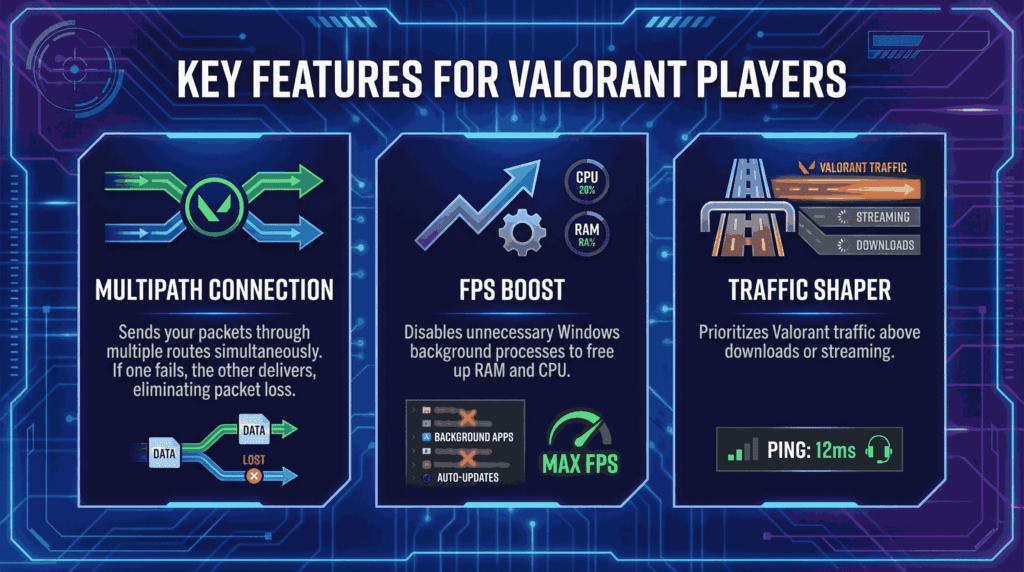
Key Features for Valorant Players
- Multipath Connection: Sends your packets through multiple routes simultaneously. If one fails, the other delivers, eliminating packet loss.
- FPS Boost: Disables unnecessary Windows background processes to free up RAM and CPU.
- Traffic Shaper: Prioritizes Valorant traffic above downloads or streaming.
🛠️ Step-by-Step: How to Configure ExitLag for Valorant
Follow these steps to optimize your connection and lower your ping by 30-70%.
1. Installation and Login
Download the software (link below) and create an account. The interface is user-friendly and dark-mode enabled.
2. Selecting Valorant
- In the search bar, type “Valorant”.
- Click on the game icon to open the optimization panel.
3. Best Settings for Valorant (2025 Updated)
| Setting | Recommendation | Why? |
| Game Region | Automatic (or closest server) | Automatic usually finds the lowest latency path. |
| TCP Routes | 2 | Ensures reliability without flooding your connection. |
| UDP Routes | 2 | Critical for movement and shooting packets. |
| Smart Optimization | Enable | Allows ExitLag to adapt in real-time. |
💡 Pro Tip: If you play on servers far from your home (e.g., playing on Tokyo servers from SEA), manually selecting the server region often yields better results than “Automatic.”
📊 Comparison: ExitLag vs. Traditional VPNs
Is it worth the subscription? Let’s look at the data.
| Feature | ExitLag 🥇 | Standard VPN 🛡️ | Free Boosters ⚠️ |
| Ping Reduction | High (Direct Routing) | Low (Encryption adds delay) | Unreliable |
| Packet Loss Fix | Multipath Tech | Single Path | None |
| FPS Boost | ✅ Included | ❌ No | ❌ No |
| Safety | 100% Safe (Riot Approved) | Safe | Risky (Adware) |
| Cost | Subscription | Subscription | Free/Freemium |
Verdict: For competitive gaming, ExitLag is superior because it prioritizes speed over encryption/privacy.
🖥️ Additional Optimization Tips (Hardware)
ExitLag handles the network, but you must handle your PC.
Optimize Graphics Settings
Even if you have a high-end PC, competitive players use these settings for maximum frame rates:
- Material Quality: Low
- Texture Quality: Low
- V-Sync: OFF (Crucial: V-Sync adds input lag!)
- Anti-Aliasing: MSAA 2x or None
Network Adapter Settings
- Use an Ethernet Cable (CAT6). Wi-Fi is the enemy of consistency.
- Update your Network Drivers via Device Manager.
- Flush your DNS: Open CMD as Admin and type
ipconfig /flushdns.
Download ExitLag
File Information:
- Software: ExitLag
- Category: Network Optimization / Game Booster
- Platform: Windows 10/11
- License: Free Trial / Premium
- Safety Status: ✅ 100% Safe & Clean
- Virus Scan: Passed (0/64 on VirusTotal)
- User Rating: ⭐⭐⭐⭐⭐ (4.8/5)
Why Download?
This is the official installer. It contains no bloatware or hidden miners. The software is widely used by professional Valorant players and is whitelisted by Riot Vanguard, ensuring you will never get banned for using it. It optimizes routes in real-time to prevent “peeker’s advantage” being used against you.
❓ Frequently Asked Questions (FAQ)
Q: Can I get banned from Valorant for using ExitLag?
A: No. ExitLag modifies your network routing, not the game files. It is fully compatible with Riot Vanguard anti-cheat.
Q: Does ExitLag increase FPS?
A: Yes, the “FPS Boost” tab disables non-essential Windows services, which can give you a 10-20 FPS boost on lower-end PCs.
Q: Is it free?
A: ExitLag offers a 3-day free trial with no credit card required. After that, it is a paid subscription service.