
Struggling with low GPU usage, stutters, or FPS drops in GTA 5 on PC? This 2026 step‑by‑step GTA 5 FPS fix covers bottlenecks, memory leaks, VRAM monitoring, and Windows 10/11 optimization so you can finally play smoothly.
If your FPS is all over the place, GPU usage is low, or the game tanks after 20–30 minutes, you’re not alone. GTA 5 is old, but it’s still heavy and a bit quirky. On some rigs, it hammers the CPU, barely touches the GPU, and slowly eats RAM/VRAM like a memory leak.
Typical symptoms you might recognize:
- GPU usage stuck at 30–60% while CPU spikes
- Smooth 60+ FPS at first, then drops to 35–45 FPS later in a session
- Stutters while driving fast through the city or using mods
- Game feels “laggy” despite “high FPS” in the counter
This guide is written from the perspective of someone who’s wrestled with GTA 5 across multiple PCs over the years. Some of these fixes felt like magic when they finally worked.
Step 1 – Monitor CPU, GPU, RAM & VRAM Properly
Before trying any gta 5 gpu usage low fix pc, you need data. Otherwise, you’re guessing.
1.1 Set up MSI Afterburner + OSD
Use MSI Afterburner with RivaTuner Statistics Server to see what’s happening inside your PC in real time.
Key stats to enable On‑Screen Display while playing GTA 5:
- GPU usage (%)
- GPU temperature
- CPU usage (per-core if you like)
- RAM usage
- VRAM usage
- FPS
This effectively becomes your gta 5 vram usage monitoring tutorial and helps with how to monitor vram and ram in gta 5 and run a gta 5 cpu gpu bottleneck test msiafterburner.
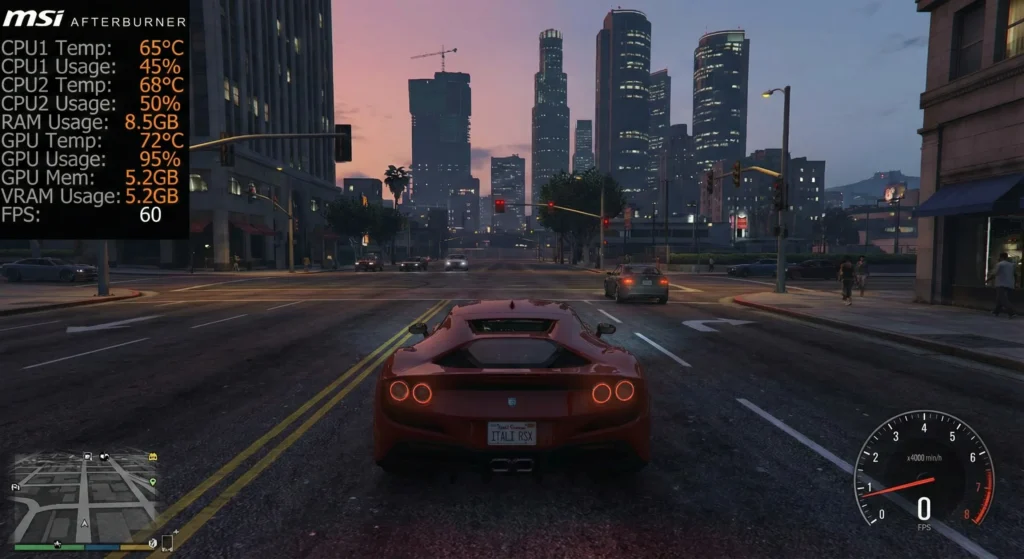
Download (example):
1.2 Find the bottleneck in GTA 5 (CPU vs GPU)
While playing:
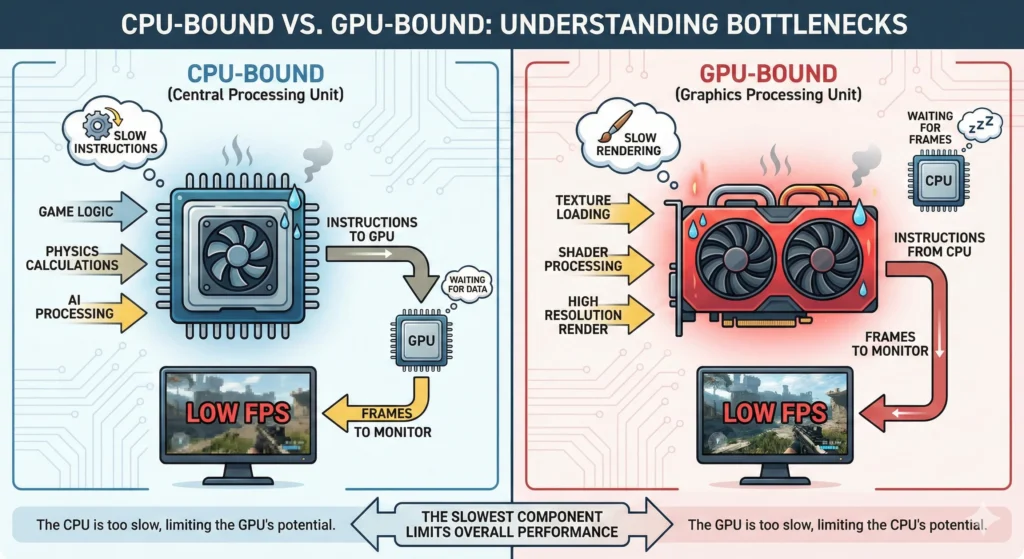
- If GPU usage is 90–99% and CPU is under ~70% → GPU‑bound (normal, just lower graphics settings if FPS is too low).
- If GPU is under ~60% but one or more CPU cores are pinned high → CPU‑bound.
- If RAM or VRAM is getting close to full and FPS slowly dies over time → likely memory leak.
That’s basically how you find bottleneck in gta 5 pc (cpu vs gpu) in a practical, gamer‑friendly way. On one of my older i5 builds, watching a single core hit 100% while my GTX card chilled at 50% was a painful but very clear answer.
Step 2 – Fix Low GPU / High CPU Usage (Stutter & Bottleneck)
Once you know you’re CPU‑bound, use this gta 5 low gpu high cpu usage solution.
2.1 In‑game graphics settings (Story Mode & Online)
For gta 5 story mode optimization for low gpu usage, prioritize:
Turn down or off (CPU‑heavy / streaming):
- Population Density
- Population Variety
- Distance Scaling
- Extended Distance Scaling
- Extended Shadows Distance
Keep moderate/high if GPU has headroom:
- Texture Quality
- Shader Quality
- Anisotropic Filtering
Weirdly, dropping “eye‑candy” like textures isn’t always the fix; it’s the streaming and CPU‑heavy settings that often kill performance.
2.2 Disable frame caps and V‑Sync (for testing)
- Turn V‑Sync off in GTA 5.
- Remove any FPS caps in the game and GPU control panel.
If GPU usage jumps up and FPS rises, you just freed your graphics card. Then you can decide whether to re‑enable a frame cap to avoid tearing.
2.3 Windows 10/11 performance tuning
This part doubles as a mini gta 5 windows 10 11 performance tuning guide:
- Set Windows Power Plan to High performance or Ultimate performance (if available).
- In Windows 10/11 “Game Mode” settings, turn Game Mode ON and disable unnecessary background Xbox/Game Bar captures.
- Close heavy background apps (browsers with many tabs, launchers, overlays).
Microsoft’s own Windows performance guidance aligns with this general approach.
With all this combined, you get a solid gta 5 stutter fix low gpu utilization on many mid‑range rigs. On my current Ryzen system, just changing the power plan and distance scaling was the difference between “microstutters all the time” and “buttery except in storms.”
Step 3 – Fix FPS Drops After 20–30 Minutes (Memory Leak Issues)
If your main problem is: smooth at first, then FPS tanks after longer sessions, you’re likely dealing with a GTA 5 memory/streaming quirk.
Players frequently report that RAM/VRAM usage creeps up over 10–30 minutes until the game stutters or crashes, classic memory‑leak‑style behavior.
This section is your gta 5 fps drops after 30 minutes fix and gta 5 long session fps drop memory leak strategy.
3.1 Keep VRAM and RAM under control
- Avoid running maxed‑out textures if VRAM is low (2–4 GB cards especially).
- Keep VRAM headroom (aim for 70–80% usage, not 95–100% all the time).
- Lower Grass Quality and Shadow Quality – they can spike streaming load.
3.2 Commandline.txt memrestrict tweaks (advanced)
Some players use memrestrict commands in a commandline.txt in the GTA 5 root folder to limit how much memory the game tries to reserve. Results vary by system, but it has helped in some memory leak scenarios.
If you try this, do it carefully and test each change. This is one of those tweaks where, honestly, it either feels like a miracle or does nothing at all.
3.3 Restart between long sessions
Simple but effective:
- After an hour or two, quit to desktop and restart the game.
- This clears RAM/VRAM usage and often restores initial FPS.
Is it elegant? No. Does it help with long‑session stability? More often than you’d expect.
Step 4 – Low‑End PCs & Modded GTA 5 (Extra Tips)
4.1 GTA 5 FPS optimization for low‑end PC (2026)
For a gta 5 fps optimization for low end pc 2026 approach:
- Use DirectX 11, but lower overall resolution (e.g., 900p or even 720p).
- Set Textures to Normal/High, but keep all “distance” sliders fairly low.
- Turn off MSAA, lower Reflection MSAA, and keep Post FX to Normal or High at most.
- Consider using a “low‑end” graphics config mod from a trusted source (careful with downloads).
On a really old laptop I tested, 720p + Normal textures + low population was the sweet spot between “looks like PS3 era” and “still playable at 50–60 FPS.”
4.2 GTA 5 modded FPS drops troubleshooting
If you’re dealing with gta 5 modded fps drops troubleshooting:
- Remove heavy ENB/Reshade presets and high‑resolution texture packs first.
- Disable script mods temporarily and test vanilla stability.
- Check for outdated mods after game updates – some scripts keep throwing errors in the background and hurt performance.
Modded setups are where you see the nastiest mix of stutters, low GPU usage, and memory leaks.
Quick Reference Table – Symptoms vs Fix
| Symptom | Likely Cause | What to Try First |
|---|---|---|
| Low FPS + GPU < 60%, CPU core high | CPU bottleneck | Lower distance/population, power plan to High performance |
| Smooth start, FPS dies after 20–30+ minutes | RAM/VRAM memory leak / streaming issues | Lower textures/grass, restart game periodically |
| High FPS counter but visible stutter while driving | Streaming + disk or background processes | Move game to SSD, close apps, defrag HDD if used |
| Mods + huge FPS drops | Heavy ENB/texture mods, broken scripts | Disable mods, re‑add one by one |
| VRAM near max, hitching in busy areas | VRAM saturation | Lower textures/shadows, reduce resolution |
Final Thought
GTA 5 can still be a bit of a diva in 2026. But with proper monitoring, a few smart tweaks, and a realistic look at your hardware limits, you can get a stable, smooth experience – whether you’re chasing a gta 5 stutter fix low gpu utilization or a more general gta 5 windows 10 11 performance tuning guide setup.
And if you want, you can turn this into a full gta 5 fps drops after 30 minutes fix and long‑term gta 5 story mode optimization for low gpu usage series by adding related internal links (e.g., separate posts on Windows tweaks, driver settings, or mod curation).
Your PC is capable of more than GTA 5 is currently giving you. You just have to make the game actually use it.