
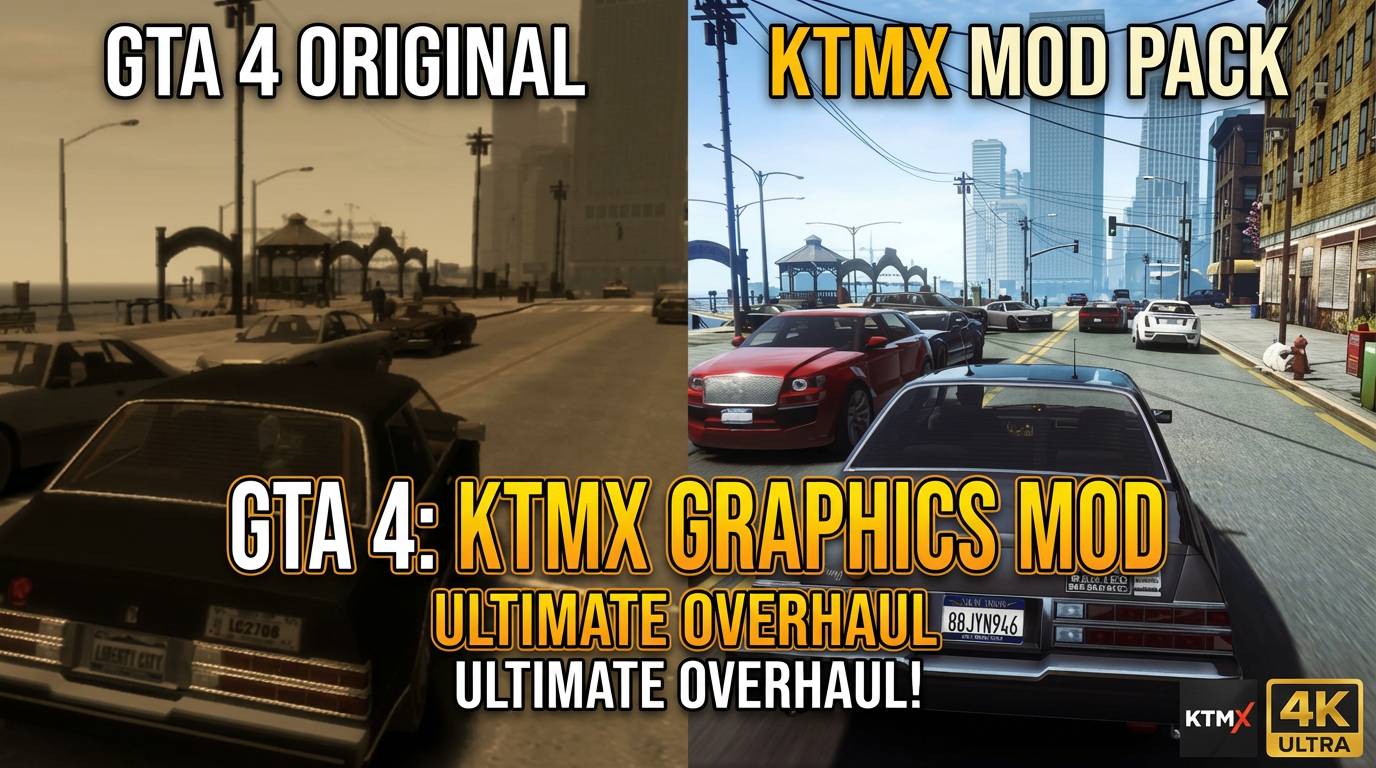
KTMX Graphics Mod for GTA 4 (2026)
Transform Liberty City with the KTMX Graphics Mod for GTA 4. This detailed guide covers installation, performance impact, and why it’s arguably the best visual upgrade for Niko Bellic’s story. Breathe new life into a classic.
I’ve spent more hours than I care to admit modding Grand Theft Auto IV. There’s something about Liberty City’s gritty charm that keeps pulling me back, but let’s be honest—the game shows its age. Over the years, I’ve tested countless graphics mods, from the popular ICEnhancer to a dozen smaller tweaks. Many of them either tank your performance or make the city look weirdly artificial. That’s why the KTMX Mod for GTA 4 was such a pleasant surprise. It’s not just another reshade preset; it feels like a thoughtful restoration.

So, grab a beverage, and let’s talk about why this mod might be the best graphics mod for your replay.
What Exactly is the KTMX Graphics Mod?
At its core, the KTMX Mod is a comprehensive visual package. It’s built on a heavily modified version of the ENB Series framework, which is the backbone for most serious GTA 4 graphical overhauls. But where others go for extreme saturation or a perpetual “golden hour” glow, KTMX takes a different path. The author aimed for a more cinematic, yet grounded look that stays true to the original’s gloomy, atmospheric vibe. I remember first loading it up and thinking, “Oh, this is what I imagined the game looked like in my memory.”
It doesn’t just slap on new colors. The mod overhauls:
- Lighting and Reflections: Ray-traced style shadows (though not true ray tracing), better water reflections, and more realistic ambient light.
- Depth of Field & Motion Blur: A cinematic, but thankfully optional, camera effect that makes distant objects and fast movement look fantastic.
- Color Correction: This is the big one. It removes that infamous “yellow filter” and replaces it with a cooler, more balanced palette. The difference in Alderney at dusk is stunning.
- Visual FX: Improved rain, better lens flare, and subtle bloom that doesn’t blind you.
Why KTMX Stands Out as a Top GTA 4 Graphics Mod
Look, you can find flashier mods. But for a balanced, playable, and authentic upgrade, KTMX is hard to beat. Here’s my take on its strengths.
1. It Prioritizes Atmosphere Over Glitz
Liberty City is a character itself—rain-slicked, oppressive, and alive. Some mods bleach this out for a sunny, GTA V feel. KTMX doubles down on the noir aesthetic. The shadows are deeper, the neon signs in Algonquin pop against the dark streets, and the weather effects feel genuinely moody. It enhances the story’s tone, rather than fighting against it.
2. Surprisingly Manageable Performance Hit
This was the biggest worry. GTA 4 is notoriously poorly optimized. I’m running it on a mid-tier rig (RTX 3060, Ryzen 5), and with KTMX, I still get a mostly stable 50-60 FPS on high settings. Compared to some ENB presets that halved my framerate, that’s a win.
Here’s a quick, rough performance comparison I logged:
| Graphics Mod | Avg FPS (My Rig) | Visual Style | Stability |
|---|---|---|---|
| KTMX Mod | 50-60 FPS | Cinematic, Cool, Atmospheric | High |
| ICEnhancer 3.0 | 30-45 FPS | Hyper-realistic, High Contrast | Medium |
| Vibrant ENB | 55-70 FPS | Saturated, Vibrant | High |
| Vanilla GTA 4 | 70+ FPS | Original, Yellow-Tinted | High |
Your mileage will vary, but the point stands: KTMX is efficient.
3. Customization and Compatibility
The mod comes with a detailed .ini file you can tweak. Don’t like the depth of field? Turn it off. Want sharper shadows? Adjust the settings. It also plays nice with most car packs, weapon mods, and even the FusionFix (an essential community patch for stability and widescreen support, available on GTAForums). I’d strongly recommend installing FusionFix first—it fixes bugs Rockstar never did.
Step-by-Step: Installing the KTMX Mod Without Headaches
Installation is straightforward if you’ve modded before. If not, don’t sweat it.
- Prep Your Game: Start with a clean, legal copy of GTA 4: Complete Edition on Steam or Rockstar Games Launcher. Verify file integrity through the client. This is the most crucial step—modding over a corrupted install is a nightmare.
- Install Prerequisites: You’ll need the latest DirectX Runtime and Microsoft Visual C++ Redistributables. These are usually bundled with other mods but worth checking.
- Get the Core Files: Download the main KTMX Mod archive from a trusted source like Nexus Mods. Always check the comments section for the latest user feedback.
- Copy and Overwrite: Extract the downloaded files. Copy the contents (usually
d3d9.dll, theenbfolder, etc.) into your main GTA IV directory (whereGTAIV.exeis located). Overwrite when prompted. - Tweak and Test: Launch the game. If you see text in the top-left corner, ENB is working. Press the
Shift + Enterkeys in-game to open the ENB configuration menu. Here you can adjust settings on the fly. Start with lower settings if performance is choppy.
Pro Tip from Experience: Run the game’s benchmark tool before and after installing. It gives you a clear, objective look at the performance impact.
Is the KTMX Mod the Best Choice for You?
Let’s be real. If you want your game to look like a vibrant Instagram post, this isn’t it. But if you want a darker, grittier, and more cinematic Liberty City that runs smoothly? Absolutely. It’s the mod I keep going back to for actual playthroughs, not just for taking screenshots.
It respects the source material while pushing it to modern standards. And in the world of GTA 4 modding, that’s a rare feat.
What’s your experience been? Have you tried KTMX or do you swear by another GTA 4 graphics mod? Struggling with the installation? Drop a comment below—I still check mine regularly and love talking mods. If you found this guide helpful, consider sharing it with other players looking to revive this classic. Happy modding, and watch out for those pigeons.

One thought on “KTMX Graphics Mod for GTA 4 (2026)”