

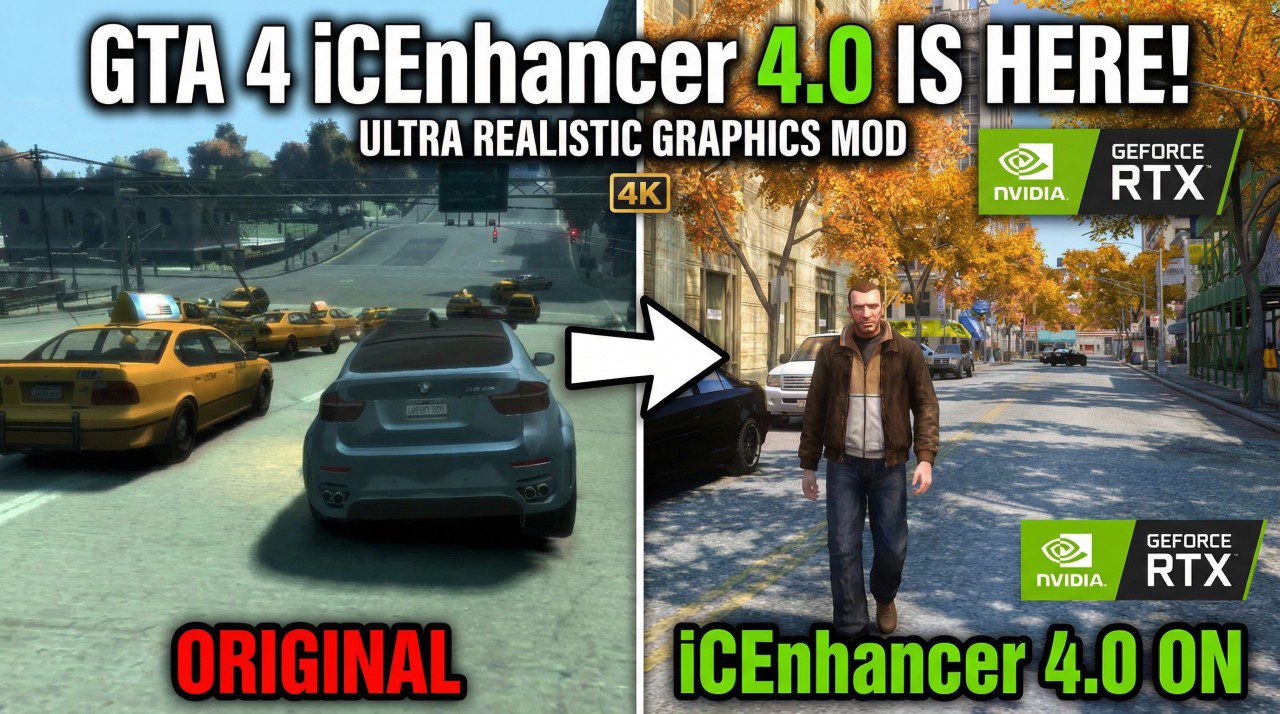
Download GTA 4 iCEnhancer 4.0 and transform Liberty City with physically-based lighting & 4K shaders. Follow our guide to install the ultimate 2026 graphics mod.
Grand Theft Auto IV remains one of the most beloved entries in the Rockstar Games franchise, celebrated for its dark atmosphere and physics-driven gameplay. However, its 2008 visuals haven’t aged as gracefully as its narrative. Enter iCEnhancer 4.0, the long-awaited graphical overhaul by legendary modder Hayssam Keilany. Released in July 2025 after a decade of development, this mod transforms the grimy streets of Liberty City into a modern visual masterpiece.
In this comprehensive guide, we will explore why iCEnhancer 4.0 is considered the “definitive” remaster, how it compares to previous versions, and what you need to do to get it running on your PC.
1. What’s New in iCEnhancer 4.0?
The jump from version 3.0 to 4.0 isn’t just a minor update—it is a complete reconstruction of how the game handles light and shadow. The most significant addition is the introduction of Physically-Based Lighting (PBL), a technique used in modern AAA titles like Red Dead Redemption 2 and Cyberpunk 2077.
Key Visual Enhancements:
- Physically-Based Lighting: Light now interacts with surfaces more realistically, reflecting off metallic cars and wet asphalt with unprecedented accuracy.
- Enhanced Fog and Atmosphere: The new fog shaders provide depth to the city skyline, eliminating the “limitless” void and replacing it with a moody, cinematic haze.
- Improved Water Rendering: Waves and reflections in the Liberty City harbor now feature high-quality shaders, making the water look liquid rather than plastic.
- Sky and Cloud Overhaul: Dynamic clouds and realistic skybox transitions ensure that sunsets look breathtakingly photorealistic.
- Performance Optimization: Despite the visual jump, the 4.0 shaders are optimized to be nearly twice as fast as older iterations, making high-end graphics more accessible.
2. iCEnhancer 4.0 vs. iCEnhancer 3.0: A Detailed Comparison
For years, iCEnhancer 3.0 was the gold standard for GTA 4 modding. However, 4.0 sets a new benchmark. Below is a comparison of the two versions based on community feedback and technical specifications.
Feature Comparison Table
| Feature | iCEnhancer 3.0 (2014) | iCEnhancer 4.0 (2025) |
| Lighting Model | Basic ENB Bloom/HDR | Physically-Based Lighting (PBL) |
| Shadow Quality | Harsh/Static | Soft & Dynamic |
| Water Shaders | Standard | High-Fidelity Reflective |
| Fog Rendering | Limited | Volumetric Depth |
| Performance | Resource Heavy | Optimized Shaders |
| Compatibility | 1.0.4.0 / 1.0.7.0 | Optimized for 1.0.4.0 |
Visual Ratings (Out of 10)
- Realism: 4.0 (9.5/10) vs 3.0 (7.5/10)
- Stability: 4.0 (9.0/10) vs 3.0 (6.5/10)
- Performance Impact: 4.0 (Light to Moderate) vs 3.0 (Heavy)
3. System Requirements and Compatibility
Before you rush to download, it is crucial to understand that GTA 4 modding is sensitive to game versions. iCEnhancer 4.0 is specifically designed for version 1.0.3.0 and 1.0.4.0 of the original game files. While it may run on the Complete Edition, players often find that downgrading provides the most stable experience.
Recommended System Specs for 4K 60FPS
- CPU: Intel Core i7-10700K or AMD Ryzen 7 5800X
- GPU: NVIDIA RTX 3070 / AMD RX 6800 or better
- RAM: 16GB DDR4
- Storage: SSD (Required for fast texture streaming)
- Software: ENBSeries binaries installed beforehand
Note: For those on modern hardware, using the DXVK (DirectX to Vulkan) wrapper is highly recommended alongside iCEnhancer 4.0 to fix stuttering issues inherent in the game’s old engine.
4. How to Install iCEnhancer 4.0 (Step-by-Step)
Installing graphics mods for GTA 4 can be intimidating, but the 4.0 release is remarkably user-friendly if you follow these steps:
- Backup Your Game: Always copy your
Grand Theft Auto IVfolder to a safe location before modding. - Downgrade (If Necessary): If you are on the Steam/Rockstar Launcher “Complete Edition,” use a GTA IV Downgrader tool to revert to version 1.0.4.0.
- Install ENBSeries: Download the core binaries from ENBDev. Copy the
d3d9.dllto your game root directory. - Copy iCEnhancer Files: Open the iCEnhancer 4.0 ZIP file. Drag and drop the “Wrapper version” files into your game folder.
- Replace Files: When prompted, click “Replace all files in the destination.”
- Launch and Configure: Run the game. You should see the iCEnhancer and ENB text in the top-left corner. Use
Shift + Enterto open the configuration menu in-game.
5. Essential Supporting Mods
While iCEnhancer 4.0 handles the lighting, it doesn’t always include high-resolution textures. To achieve a truly “Remastered” look, consider pairing it with these essential mods:
- The Liberty City Upscale Project: Enhances world textures to 4K using AI upscaling.
- Potential Grim’s Textures: Specifically designed to work with the iCEnhancer color palette.
- FusionFix: A mandatory mod that fixes many engine-level bugs, such as broken shadows and zoom-in issues on modern monitors.
You can find a vast library of these assets at GTAInside, a premier destination for the modding community.
6. The Verdict: Is It Worth It?
For any fan of Niko Bellic’s journey, iCEnhancer 4.0 is an absolute essential. It breathes new life into a game that is nearly two decades old, providing a visual fidelity that rivals current-generation titles. While the setup requires some patience—specifically the downgrading process—the payoff is a Liberty City that feels more alive and immersive than ever before.
With the next GTA title on the horizon, revisiting the fourth installment with these visuals is the perfect way to bridge the gap. For the latest updates and direct downloads, keep an eye on the official iCEnhancer website.
